You can often repair LED screen water damage on a modular commercial or outdoor rental LED video wall if you cut AC power immediately, keep wet cabinets out of sealed flight cases, flush out any mineral or saltwater residue, dry all internal electronics completely, and run a staged low-brightness dehumidification schedule (5% to 100% over 12–24 hours) before full show output. By contrast, a sealed consumer television or laptop panel with liquid inside the diffuser stack is rarely economical to salvage—which is why your first step is separating consumer screens from modular outdoor LED cabinets.
30-Second Scope Triage: Consumer Screen vs. Modular Outdoor LED Wall
– Consumer LED TV / Laptop / Monitor (led tv screen water damage): These are backlit LCD panels with thin laminated diffuser films and non-modular edge drivers. If water enters the lower bezel, dark blotches, vertical lines, or shorted ribbon COFs usually cost more to repair than replacing the display. Unplug it, lay it flat in a dry airflow zone for 48–72 hours, and never apply heat guns.
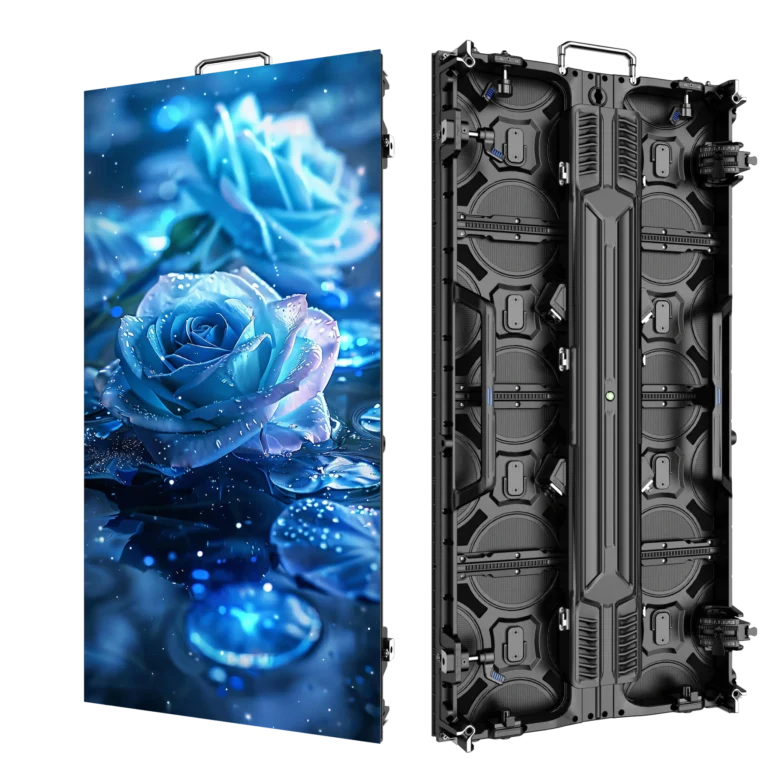
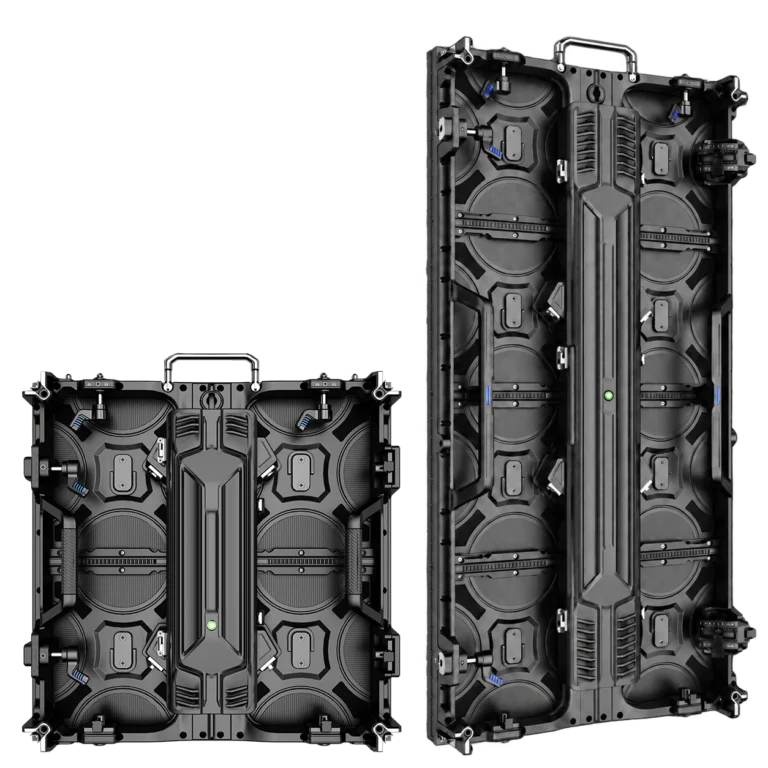
– Commercial & Outdoor Rental LED Video Wall (This Engineering Guide): Modular cabinets such as P3.91 500×1000 mm and 500×500 mm outdoor rental panels separate the front LED modules, power supply unit (PSU), receiving card, HUB board, and waterproof gaskets. Even after heavy storm ingress or humid warehouse storage, individual failed modules or power supplies can be isolated, dried, and swapped without scrapping the entire screen.
1. Interactive Tool: Outdoor LED Screen Wet-Recovery & Dehumidification Schedule Generator
Use this field tool before applying AC power to any rain-soaked, cleaned, or humidity-soaked modular LED display. Choose your exposure scenario, cabinet tier, ambient relative humidity, and wet/idle duration to generate a go/no-go power verdict, an exact staged NovaLCT brightness ramp, a component inspection checklist, and a 1600×900 Warehouse Burn-In Sheet PNG you can print or drop directly into your crew chat.
Outdoor LED Screen Wet-Recovery & Dehumidification Schedule Generator
Prevent SMD1921 popcorn-effect dead pixels, verify pre-power drying hours, and export a 1600×900 warehouse burn-in sheet PNG.
Mandatory Field & Bench Triage Steps
Engineering maintenance guidance for modular commercial LED cabinets. Always verify AC power supply insulation resistance with a multimeter before re-energizing wet hardware.
2. Can You Repair a Water-Damaged Outdoor LED Screen? Immediate 60-Minute Emergency Triage
Yes—in most storm or rain incidents, can you repair a water damaged outdoor led screen comes down to whether you cut AC power before water bridges the 5 V power rails or 220 V / 110 V mains input, and whether the liquid was clean rainwater versus conductive saltwater or mud. Modular outdoor rental walls isolate the front modules, power supply, HUB distribution board, and receiving card so crews can dry healthy assemblies and swap only corroded sub-components.
When water hits an active show wall or leaks into a warehouse trailer, panic causes more permanent failures than the rain itself. Crews frequently power the screen back on “just to check which tiles survived,” turning a 2-hour drying job into 12 blown receiving cards and shorted driver ICs.
The First 60 Minutes: What Saves Hardware vs. What Kills It
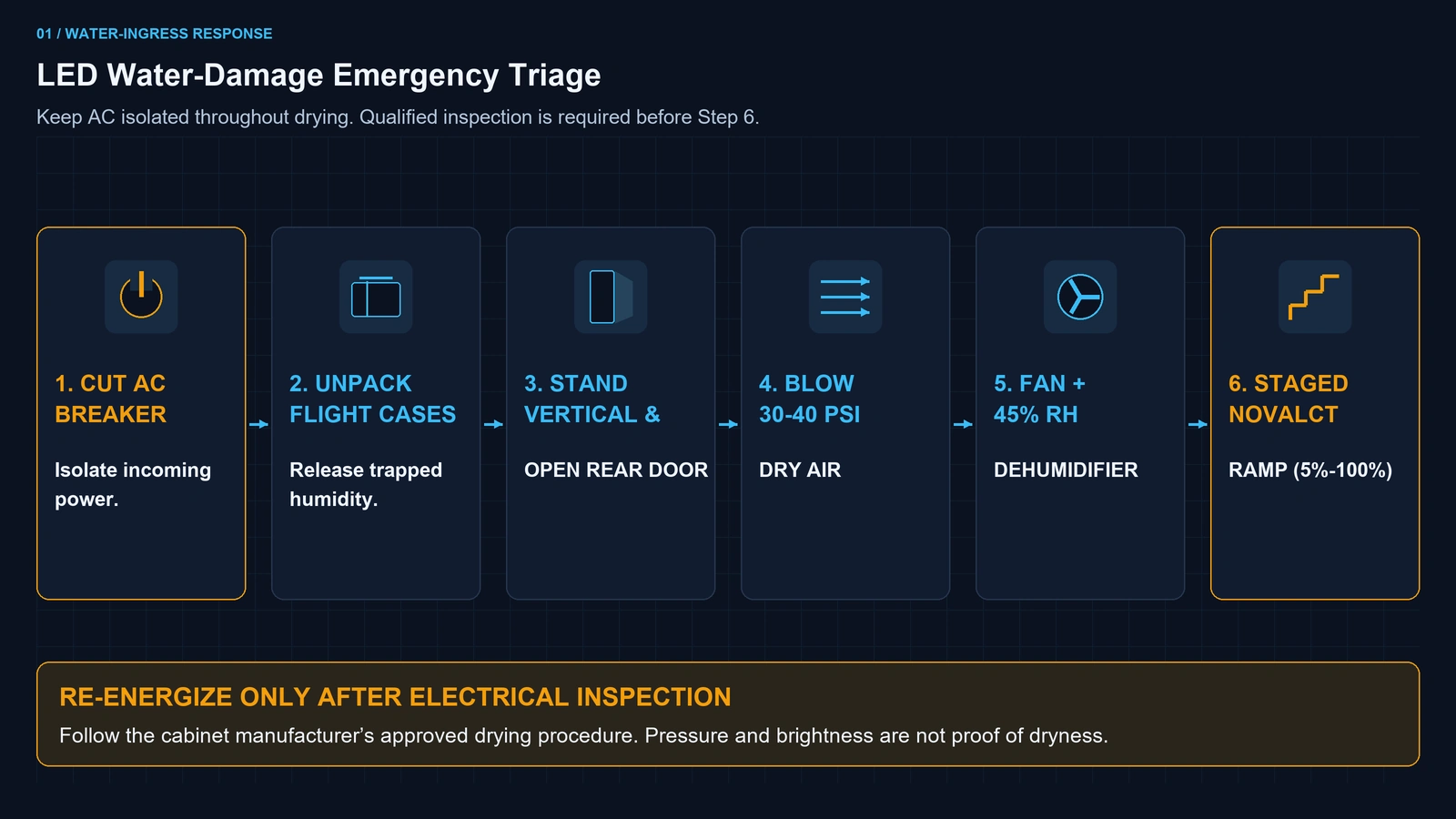
Follow this strict sequence before testing a single pixel:
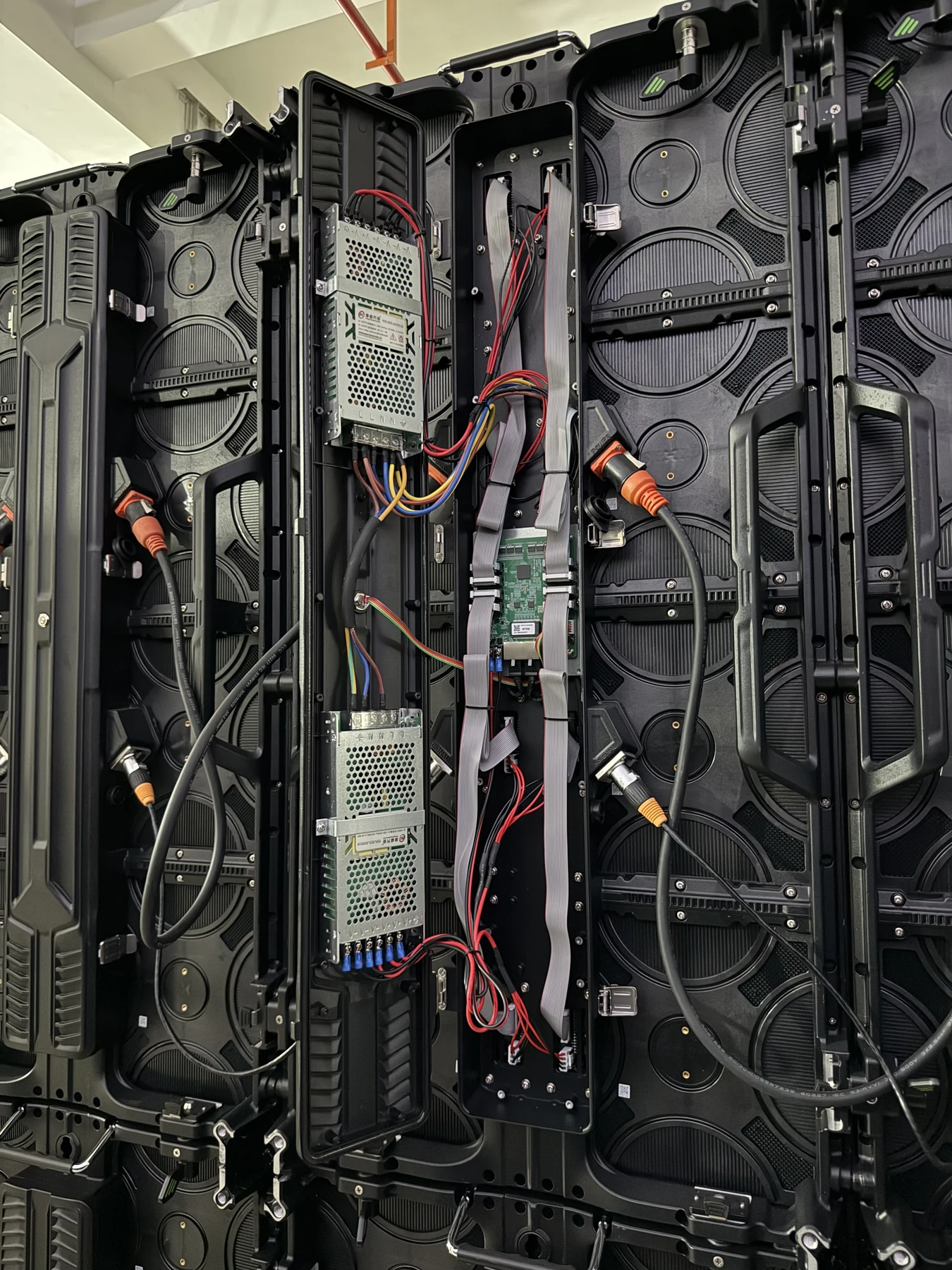
- Kill main AC distribution at the breaker—not just the video processor: Turning off your NovaStar CMS130, CMS260, or VX1000 only stops the video signal. Every LED cabinet’s internal 5 V switching power supply remains live until the upstream breaker or PowerCON True1 trunk is pulled.
- Do not seal damp panels inside airtight flight cases: A 6-in-1 500×1000 mm flight case or 8-in-1 500×500 mm case lined with EVA foam turns into a sauna overnight. Even if rain only wet the rear handles and gasket lips, closing the lid drives relative humidity above 95% inside the case and forces condensation onto the PCB solder pads.
- Stand cabinets vertically and open rear service doors: Tilt panels slightly forward or keep them upright on dry wooden pallets so water drains away from the central power box rather than pooling inside the HUB connector socket.
- Blow out standing water with regulated dry air (30–40 PSI): Target the perimeter locking mechanisms, rear door rubber gasket channel, etherCON shells, and the recessed seam between the 250×250 mm modules. Never blast high-pressure shop air directly under an SMD mask lip.
- Flush dirty floodwater or coastal spray with distilled water + 99% isopropyl alcohol (IPA): Clean rainwater evaporates cleanly; floodwater, beer/soda spills at festivals, and coastal salt mist leave conductive ionic crystals under QFN driver ICs. Rinse affected PCBs with deionized/distilled water, then flush with 99% IPA to displace water from beneath surface-mount components.
- Never use heat guns, hair dryers, or space heaters next to LED masks: Concentrated heat above 60°C warps polycarbonate louver masks, softens silicone potting adhesion, and triggers immediate moisture steam expansion inside SMD packages. Use high-volume room-temperature box fans paired with a commercial dehumidifier holding the shop at 40–50% RH.
Component-Level Salvageability Matrix (Outdoor Modular Cabinets)
| Sub-Assembly Inside an Outdoor LED Cabinet | Clean Rainwater (Power Off Fast) | Energized While Wet (Short Circuit) | Saltwater / Mud / Beverage Spill | Practical Field Decision |
|---|---|---|---|---|
| Front 250×250 mm LED Modules (SMD1921) | Usually salvageable after drying + staged dehumidification | Dead rows/columns or burnt driver ICs | Rinse with distilled water + 99% IPA; inspect solder pads | Swap failed modules from your spare kit; see our LED screen problems module-swap guide |
| Internal 5 V Switching Power Supply (PSU) | Bench-dry 48–72 hrs; verify insulation resistance before load | Blown primary fuse/MOSFET; replace unit | Replace immediately (safety risk on mains side) | Never gamble on a submerged AC-to-DC PSU; stock factory spares |
| Receiving Card (NovaStar / Compatible) | High survival if dried + contacts cleaned with IPA | Burned FPGA or voltage regulator | Clean pins with 99% IPA; test on known-good cabinet | After replacement, recover config using NovaLCT Read from Receiving Card |
| HUB Board & Ribbon/Board-to-Board Headers | High survival once corrosion-free | Pin carbonization / arc tracks | Ultrasonic or IPA brush clean; inspect for green copper oxide | Replace any header with darkened or pitted pins |
| Rear Door Silicone Gasket & True1/etherCON Seals | Clean and dry; check for pinched sections | N/A unless melted | Rinse salt crystals completely so rubber stays supple | Replace flattened or torn gaskets before the next outdoor booking |
Post-Storm Visual Symptom Diagnostic Guide (What Your Screen Is Telling You)
Once a cabinet passes bench insulation checks and enters low-brightness testing, visual artifacts tell technicians exactly where LED screen water damage penetrated the signal or power chain:
| Observed Symptom on Test Pattern | Most Likely Moisture / Water Failure Point | Immediate Bench Action |
|---|---|---|
| Single dark or stuck-color 250×250 mm module | Corroded ribbon/board-to-board pin or shorted driver IC on that module | Swap the affected module with a batch-matched spare; test the dry module on a known-good bay |
| Horizontal or vertical dead pixel line (“caterpillar effect”) | Micro-moisture steam expansion (popcorn effect) or corroded row/column MOSFET leg | Quarantine module for factory rework; extend dehumidification ramp on adjacent cabinets |
| Whole cabinet flickers or drops out while neighbors stay normal | Damp etherCON data jack, oxidized receiving card gold fingers, or wet HUB board | Clean receiving card edge connector with 99% IPA; swap receiving card and run NovaLCT recovery |
| Green/magenta color shift across half a cabinet | Moisture bridging a single RGB data line on the HUB board or signal ribbon | Power down, unplug signal harness, flush headers with 99% IPA, and dry 12+ hours |
| Immediate AC breaker or GFCI trip when feeder energizes | Water inside 5 V PSU mains stage or wet PowerCON True1 daisy-chain coupler | Disconnect trunk immediately; isolate cabinet by cabinet and replace any damp AC PSU |
3. The Hidden Killer After Rain: Why Full Brightness Causes SMD “Popcorn Effect” (And the Safe Dehumidification Schedule)
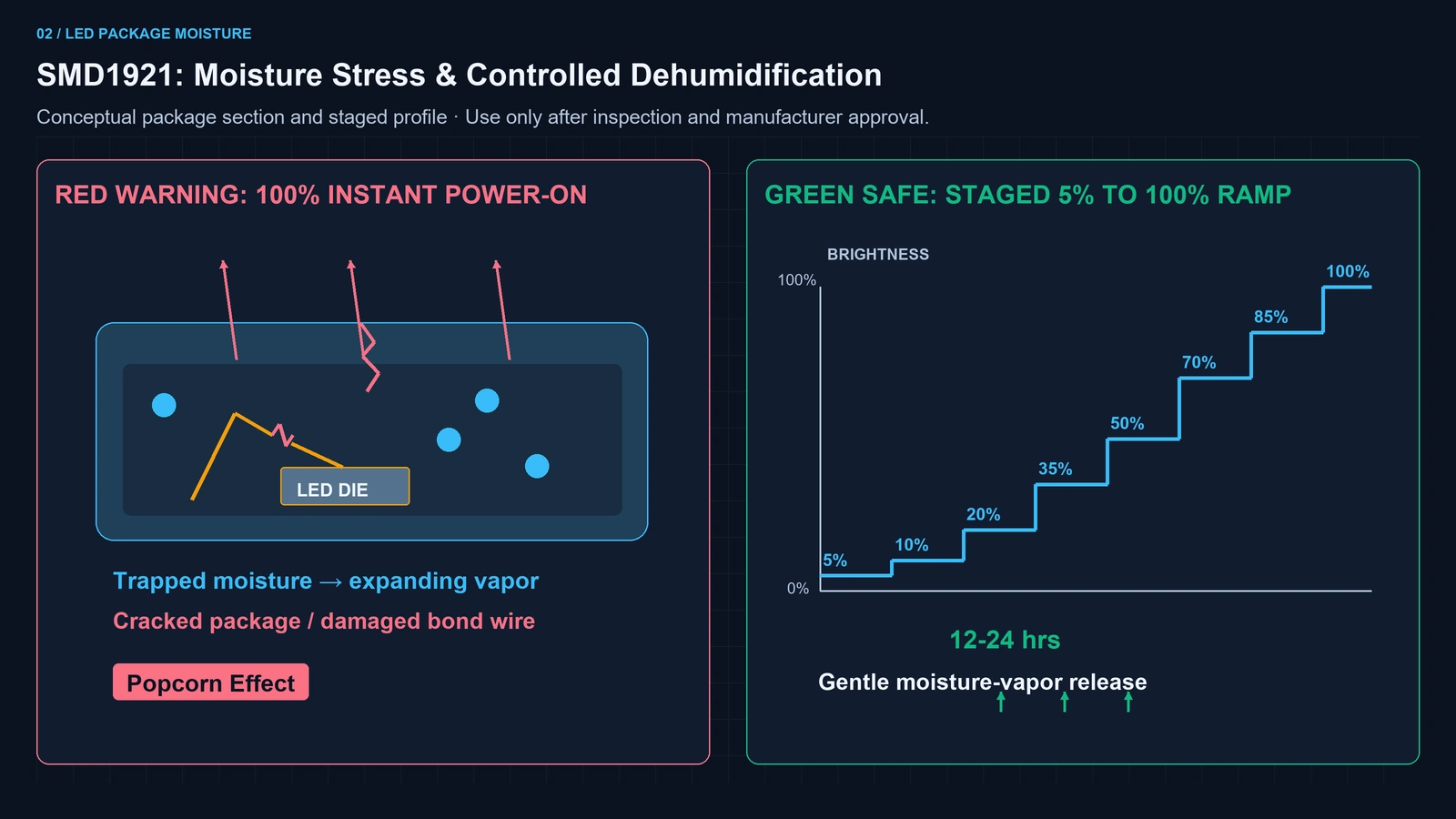
Powering a damp or long-stored outdoor LED screen straight to 100% brightness rapidly heats internal LED dies above 85–100°C, flashing microscopic water trapped inside the SMD epoxy/PPA housing into pressurized steam. That thermal expansion—known in semiconductor packaging as the “popcorn effect”—cracks internal bond wires, delaminates the chip package, and triggers delayed LED screen water damage in the form of spreading dead pixel lines (the “caterpillar effect”) days after a show looks normal.
Even an outdoor panel that feels bone-dry to the touch absorbs water vapor over days in humid venues, coastal transport containers, or non-climate-controlled rental shops. Standard outdoor SMD1921 packages and indoor SMD2020 packages are moisture-sensitive polymer assemblies. When a 3,500–4,200 cd/m² outdoor wall draws up to 800 W/m² peak power right out of a damp truck, the thermal shock happens inside the LED cup within seconds—long before an operator sees smoke or trips a breaker.
Industry-Standard 12-Step Dehumidification Burn-In Schedule (NovaLCT)
When recovering cabinets after heavy rain exposure, monsoon humidity (>80% RH), or 30+ days of unpowered warehouse storage, do not guess brightness levels. Connect your wall to your NovaStar controller (CMS130, CMS260, or VX1000), open the Brightness control tab in NovaLCT, send a uniform neutral white or soft-gray test pattern, and walk through this gradual bake-in schedule:
| Burn-In Stage | NovaLCT Brightness Setting | Recommended Duration (Heavy Wet / >30d Humid) | Recommended Duration (Light Damp / 7–14d Idle) | Engineering Purpose |
|---|---|---|---|---|
| Stage 1 | 5% | 2 hours | 1 hour | Gentle low-current warm-up (~30–35°C); verifies no short circuits |
| Stage 2 | 8–10% | 2 hours | 1 hour | Begins slow surface vapor diffusion from resin pores |
| Stage 3 | 15% | 2 hours | 1 hour | Stabilizes PCB temperature across power and signal planes |
| Stage 4 | 20% | 2 hours | 1 hour | Deepens moisture migration without crossing steam-flash threshold |
| Stage 5 | 30–35% | 2 hours | 1.5 hours | First medium-current thermal hold; inspect for single dark pixels |
| Stage 6 | 45–50% | 2 hours | 1.5 hours | Mid-power baking; monitors PSU rail stability across all rows |
| Stage 7 | 65–70% | 2 hours | 1 hour | High-current evaporation of residual humidity in rear enclosure |
| Stage 8 | 80–85% | 2 hours | 1 hour | Near-show thermal soak; check color uniformity and seam alignment |
| Stage 9 | 100% | 1–2 hours | 1 hour | Final burn-in verification before packing or festival load-in |
Field Habit That Cuts Failure Rates in Humid Climates: Rental houses operating in Southeast Asia, coastal US states (Florida, Gulf Coast), or rainy European summer circuits schedule a weekly 2–4 hour warehouse power-on cycle at 30–50% brightness whenever outdoor rental cabinets sit idle for more than 10 days. Self-heating from the modules and power supplies keeps internal humidity low without stressing the diodes.
4. What Does an IP65 LED Display Actually Protect—And Where Does Water Still Get In?
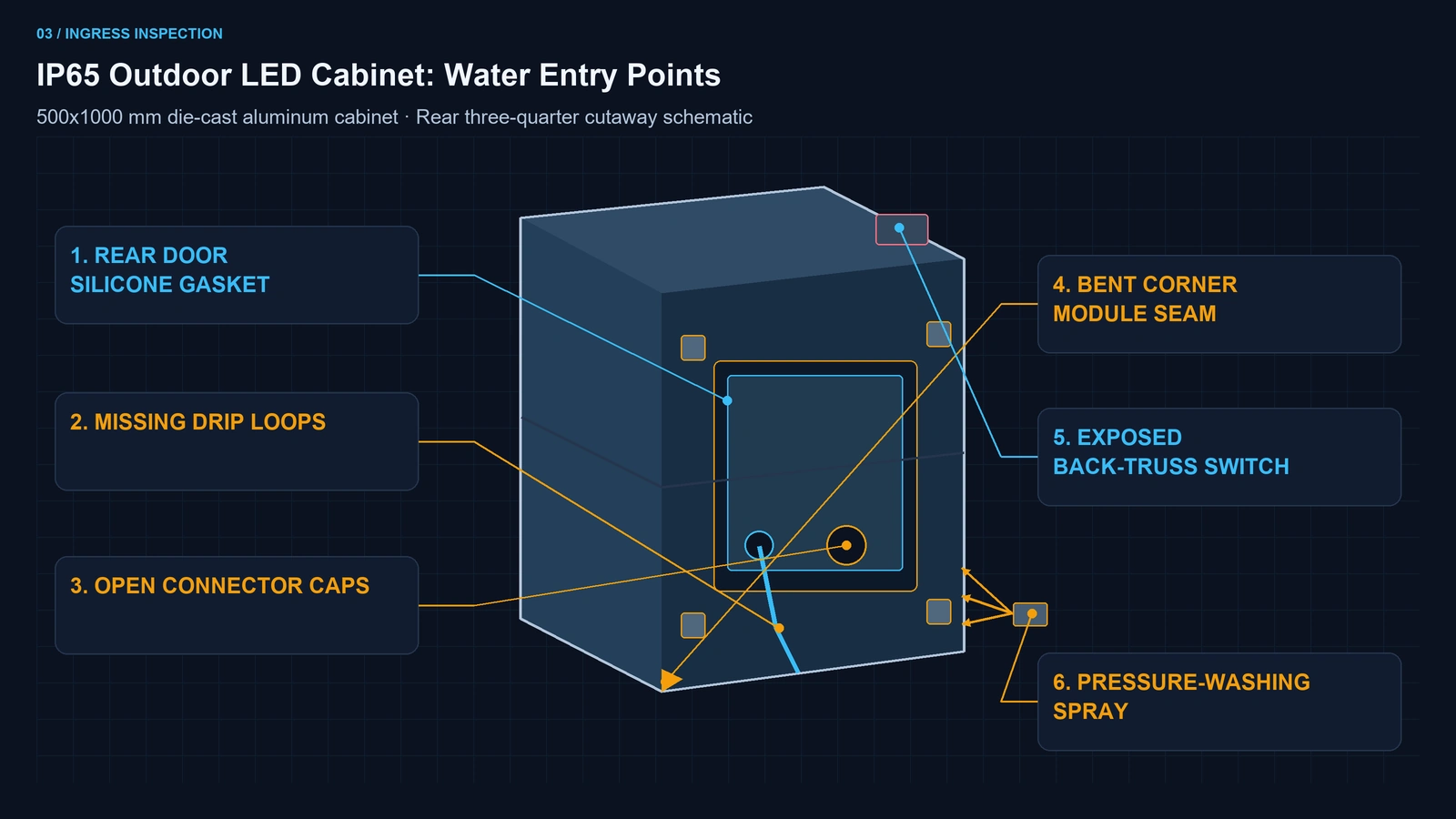
An IP65 LED display rating (under IEC 60529) means the cabinet enclosure is completely dust-tight (6) and resists low-pressure water jets from any direction (5)—not high-pressure washing (IP66/IP69K) and not submersion (IP67/IP68). On real outdoor concert and event sites, water almost never penetrates intact front silicone potting; instead, 80%+ of field LED screen water damage happens at six predictable mechanical weak points on the rear, seams, and cable interconnects.
Buyers shopping for a waterproof LED screen or outdoor waterproof LED screen often assume the letters “IP65” make an entire video wall immune to weather. In practice, an IP65 LED screen rating is a cabinet-level environmental reference, not a blanket guarantee covering unsealed third-party cabling, pinched gaskets, wind-driven rain behind an unroofed truss, or improper rigging. Understanding where water actually breaches an IP65 outdoor LED display protects both your rental ROI and your show uptime.
IP Rating Comparison for Commercial & Rental LED Walls
| Ingress Rating | Solid / Dust Protection | Liquid Protection (IEC 60529) | Typical LED Screen Application | What It Does NOT Survive |
|---|---|---|---|---|
| IP30 / IP40 | Basic solid objects only | None | Indoor rental & fixed indoor walls (600–800 cd/m²) | Rain, outdoor mist, wet cleaning sprays, condensation |
| IP54 (Often Rear-Side) | Limited dust ingress | Splashing water from any direction | Rear service side of some hybrid cabinets | Direct wind-driven storm jets hitting exposed rear backs |
| IP65 (Front / Cabinet Ref.) | Complete dust-tight seal | Low-pressure water jets (6.3 mm nozzle, 12.5 L/min, 3 m) | Standard waterproof LED screen for outdoor stages, festivals, touring P3.91 | Submersion, standing puddle flooding, pressure washers, unseated cable boots |
| IP66 | Complete dust-tight seal | Powerful high-pressure water jets (100 L/min) | Coastal exposed fixed billboards | Flood submersion |
| IP67 / IP68 | Complete dust-tight seal | Temporary / continuous immersion (1 m+ depth) | Sealed stage wash fixtures, submerged architectural LED | Rare on serviceable rental video panels due to rear maintenance needs |
The 6 Real-World Water Entry Points on an IP65 Waterproof LED Display
- Pinched or Aged Rear Maintenance Door Gaskets: Outdoor rental cabinets such as a 500×1000 mm rear-service P3.91 panel (see our front vs. rear service LED display comparison) rely on a continuous silicone seal around the central power/control box. After dozens of show strikes, a pinched ribbon wire or hardened rubber ring breaks compression and lets rainwater wick straight onto the receiving card.
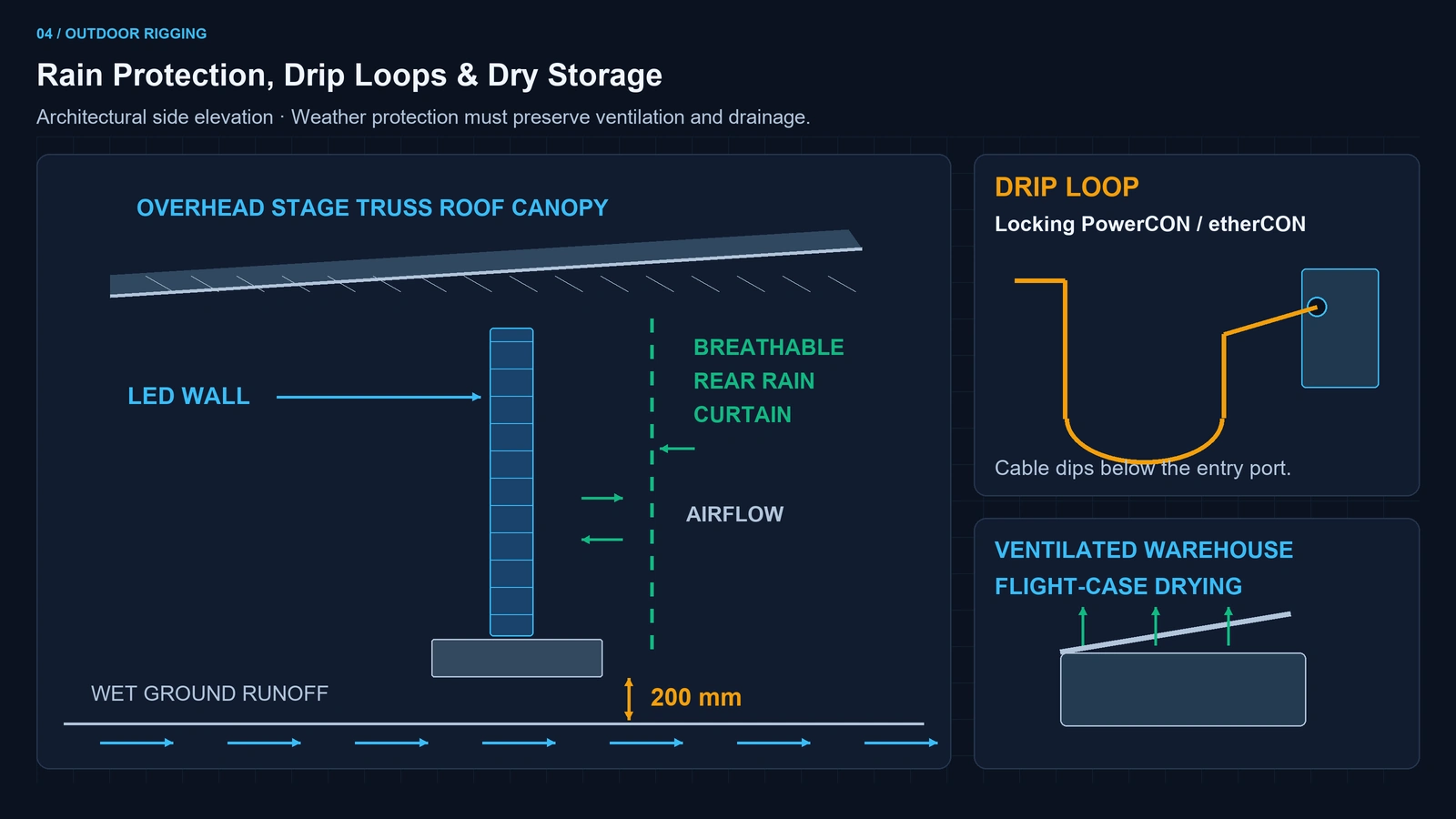
- Missing Drip Loops on PowerCON True1 and etherCON Jumpers: Even locking weather-resistant connectors leak when vertical cables funnel rainwater straight down into an upward-facing socket. Always form a downward U-shaped drip loop below every cabinet inlet so gravity pulls water off the jacket before it reaches the connector gasket.
- Unsealed Unused Ports (Missing Rubber Dust/Water Caps): On the last cabinet of a daisy chain—or on spare backup data ports—leaving an open etherCON or PowerCON Out cap dangling invites wind-blown mist straight into the power box.
- Module-to-Frame Edge Seams After Corner Impacts: Dropping a 12.5 kg cabinet corner during load-out slightly bends the die-cast aluminum perimeter frame. That 0.5 mm warp breaks the compression seal between the 250×250 mm outdoor module gasket and the cabinet chassis.
- Non-Waterproof Signal Accessories Mounted on the Back Truss: Your waterproof LED display panels may survive a 45-minute cloudburst while an unprotected fiber converter, cheap Ethernet switch, or unenclosed LED video wall processor rack sitting behind the stage dies in 30 seconds.
- Pressure Washing or Aggressive Chemical Sprays: This directly answers a common maintenance search—can led screen get water damaged while cleaning? Yes. Even on an IP65 waterproof LED display, blasting modules at close range with a garden pressure nozzle or soaking them with ammonia/alcohol glass cleaners forces moisture past edge potting, clouds optical shaders, and corrodes exposed steel screws.
5. Safe Cleaning & Rain-Proof Field Setup Checklist (Preventing LED Screen Water Damage Before It Happens)
Keeping a LED screen waterproof across 3–5 years of touring requires operational discipline during both routine cleaning and outdoor load-in. Use this checklist with your warehouse and festival crews before every rainy-season booking.
Can an LED Screen Get Water Damaged While Cleaning? Safe Cleaning SOP
Yes—improper cleaning is one of the top non-storm causes of LED screen water damage. Never spray liquid directly onto LED modules or use pressure washers.
| Cleaning Task | Safe Procedure for Outdoor IP65 Modules | Never Do This |
|---|---|---|
| Dry Dust & Haze Residue Removal | Use a soft anti-static bristle brush or low-pressure dry air (<30 PSI) while the screen is powered off | High-pressure compressed air aimed under module louvers |
| Mud / Fingerprints on Front Silicone Potting | Lightly dampen a lint-free microfiber cloth with distilled water (wring until barely damp), wipe gently along mask rows, then air-dry with fans | Spraying tap water, Windex, acetone, or soaking cabinet edges |
| Connector Pin & Contact Maintenance | Use electronic contact cleaner or 99% IPA on a lint-free swab with power disconnected; let evaporate 15+ minutes | Spraying lubricant oils or standard WD-40 into etherCON or power pins |
| Post-Cleaning Verification | Wait until completely dry, then run a 30-minute 20% → 50% → 100% check before loading cases | Powering on immediately while moisture beads remain in louver grooves |
Outdoor Festival & Event Rain-Readiness Protocol
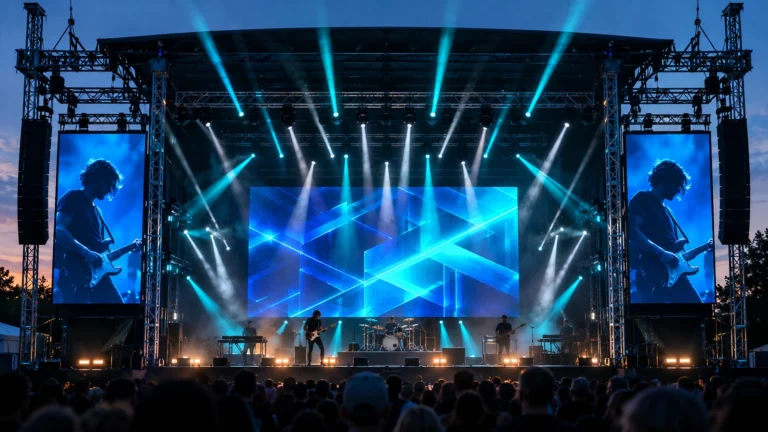
When rigging an outdoor stage wall—whether a 6×4 m concert screen (48 cabinets) or a full festival system from our 12 LED screen stage design ideas—build weather defense into the stage plot from day one:
- Roof Canopy & Back-Side Rain Skirt: Even with an IP65 cabinet reference, an overhead stage canopy plus a breathable rear rain curtain shields the power distribution rack, rear connectors, and technician access bay from driving horizontal rain.
- Elevate Ground-Stack Bases Above Standing Water: Never set bottom-row ground-stack beams directly inside drainage swales or mud basins. Raise the base deck on leveled steel staging or waterproof platforms at least 150–300 mm above ground runoff.
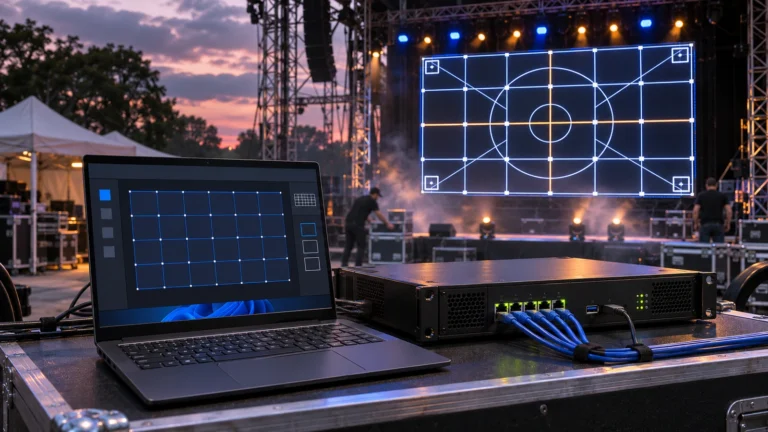
- Weather-Rated Power & Fiber Distribution: Keep your CMS130, CMS260, or VX1000 processor rack inside a weather-protected FOH or monitor-world enclosure, use 1:1 Ethernet port hot backup on critical main walls, and verify total power headroom against our LED display power consumption worksheet.
- Pack Desiccant Packs & Inspect Gaskets Every 10 Shows: Drop rechargeable silica gel canisters into flight cases during humid summer tours, and inspect rear door rubber seals every 10 load-outs as part of standard LED display spare parts maintenance.
6. Specifying a Weather-Resilient Outdoor P3.91 Rental LED Display (Verified WUYESTAGE Hardware Baseline)
When rental companies upgrade aging indoor panels or replace fleets affected by LED screen water damage with a dedicated waterproof LED display or waterproof LED display screen, evaluating the physical cabinet architecture matters far more than a brochure badge. Compare indoor vs. outdoor cabinet trade-offs in our P3.91 LED display guide and stage LED screen buying guide, and use the verified hardware reference below for WUYESTAGE’s flagship P3.91 500×1000 Outdoor Rental LED Display and Outdoor Rental LED Display Cabinet Series to benchmark any outdoor quotation accurately:
| Specification Parameter | Verified WUYESTAGE Outdoor P3.91 Reference | Why It Matters for Weather Resilience & Field Recovery |
|---|---|---|
| Outdoor Protection Reference | IP65 (cabinet-level reference) | Sealed front module face and enclosed rear service housing for outdoor event use (Note: IP65 cabinet reference does not replace full-site weather, rigging, or electrical enclosure certification) |
| Pixel Pitch & LED Module | P3.91 (250×250 mm module, 64×64 px, 65,536 px/m²) | Standardized 250×250 mm modular architecture lets crews swap a single damaged tile in minutes |
| Outdoor Brightness & Refresh | 3,500–4,200 cd/m², 7680 Hz, 1/28 scan | Clear daylight visibility under outdoor stage canopies while supporting smooth dimmed burn-in |
| Cabinet Formats & Net Weight | 500×1000 mm (12.5 kg) / 500×500 mm (7.5 kg) | Fast two-person unhanging and rapid strike when storm wind/rain evacuation triggers |
| Default Flight Case Packing | 6 cabinets/case (500×1000 mm) · 8 cabinets/case (500×500 mm) | Predictable truck and warehouse drying-bay footprint |
| Power Reference (Series) | 800 W/m² max / 240 W/m² avg | Clear sizing for weather-protected distro breakers and staged dehumidification loads |
| Service & Installation | Rear maintenance · Hanging & Ground Stacking (curve lock optional) | Direct access to the centralized power/receiving card box for dry-out inspection |
| Compatible Processors (Optional) | NovaStar CMS130 (2p / 1.3M px), CMS260 (4p / 2.6M px), VX1000 (10p + fiber / 6.5M px) | Full NovaLCT brightness scheduling for dehumidification cycles and 1:1 hot backup |
Before issuing a purchase order for an outdoor fleet, walk through our 5-gate outdoor LED screen buyer guide, estimate your exact cabinet matrix in the LED wall calculator, and confirm that your quotation includes a matched 3–5% batch-calibrated spare module, PSU, and receiving card kit alongside the exact .rcfgx factory configuration file. If you also need full outdoor show weatherproofing, pair your IP65 video wall with IP65-rated outdoor stage lighting from our outdoor LED display category and contact our engineering team with your screen dimensions, climate zone, and controller requirements.
7. Frequently Asked Questions About LED Screen Water Damage & IP65 Protection
Can you repair a water-damaged outdoor LED screen?
Yes, most modular outdoor rental LED screens can be repaired if AC power is cut immediately before short circuits occur. Separate wet cabinets from sealed flight cases, blow out standing water at 30–40 PSI, rinse any saltwater or mud residue with distilled water and 99% isopropyl alcohol, air-dry for 24–72 hours with fans and a dehumidifier, test the 5V power supply unloaded, and run a staged NovaLCT dehumidification brightness ramp from 5% to 100%. Permanently damaged 250×250 mm modules, PSUs, or receiving cards can be swapped individually.
Why should you never turn on a wet or humid LED screen at 100% brightness?
Jumping straight to 100% brightness rapidly heats LED dies above 85–100°C, flashing microscopic moisture absorbed inside SMD1921 or SMD2020 plastic encapsulants into steam. This thermal expansion—called the popcorn effect—cracks internal bond wires, causes dead pixel rows (the caterpillar effect), and can permanently ruin otherwise recoverable modules. Always step brightness up gradually from 5–10% over 8–24 hours.
Can an LED screen get water damaged while cleaning?
Yes. Even an IP65 outdoor LED display can suffer water damage if cleaned with a high-pressure washer, sprayed directly with liquid cleaners, or wiped while powered on. Safe cleaning requires disconnecting AC power, brushing off dry dust with a soft anti-static brush, wiping stubborn marks with a barely damp distilled-water microfiber cloth, and letting panels dry fully with airflow before power-on.
What does IP65 mean on an outdoor waterproof LED screen, and is it fully waterproof?
Under IEC 60529, IP65 means the cabinet enclosure is dust-tight (6) and protected against low-pressure water jets from any direction (5). It handles normal outdoor rain during events, but it is NOT rated for submersion, floodwater, or pressure washing. Most field leaks happen through pinched rear door gaskets, missing connector caps, or cables installed without downward drip loops.
How long should you dry an outdoor LED wall before turning it back on after heavy rain?
After light rain on an intact IP65 wall, 12 hours of open-air ventilation out of flight cases plus a 7-hour staged warm-up is typically sufficient. After heavy rain with back-side ingress, allow 36–48 hours of forced fan drying in a 40–50% RH room and bench-test PSUs first. After flooding or saltwater immersion, allow at least 72 hours after distilled-water/99% IPA flushing, replace submerged AC power supplies, and run a full 24-hour dehumidification burn-in.
Can you dry a wet LED display with a heat gun or hair dryer?
No. Heat guns and hot hair dryers exceed 60–100°C at close range, which warps polycarbonate module masks, softens waterproof silicone potting, and accelerates internal steam expansion (popcorn effect) inside damp SMD packages. Always use room-temperature box fans, clean compressed air at 30–40 PSI, and a commercial dehumidifier.
What are the early signs of LED or LCD screen water damage, and how do you dry a wet consumer panel safely?
Common signs of screen water damage include flickering, vertical or rainbow lines, half-blank modules, dark or foggy backlight patches, dead pixel chains, and white oxidation on internal connectors. If a consumer LED TV or LCD monitor gets wet, unplug it immediately, blot surface liquid with a dry microfiber cloth, never use a hair dryer or heat gun, and leave it in dry room-temperature airflow for 48–72 hours; unlike modular outdoor rental LED walls where individual modules and PSUs can be swapped, laminated consumer LCD panels with internal diffuser liquid are rarely economical to repair.
When should you call a professional LED screen repair service instead of fixing wet cabinets in-house?
Rental crews can safely handle immediate power-off triage, compressed-air drying, 99%+ isopropyl alcohol (IPA) cleaning of lightly oxidized HUB pins, staged NovaLCT low-brightness dehumidification, and direct swaps of spare LED modules, power supplies, or receiving cards. Escalate to factory-level or specialized commercial AV repair when saltwater or floodwater reaches SMD1921 lamp legs across multiple batches, power supplies fail insulation checks, or cabinet-level reflow and batch color recalibration are required.