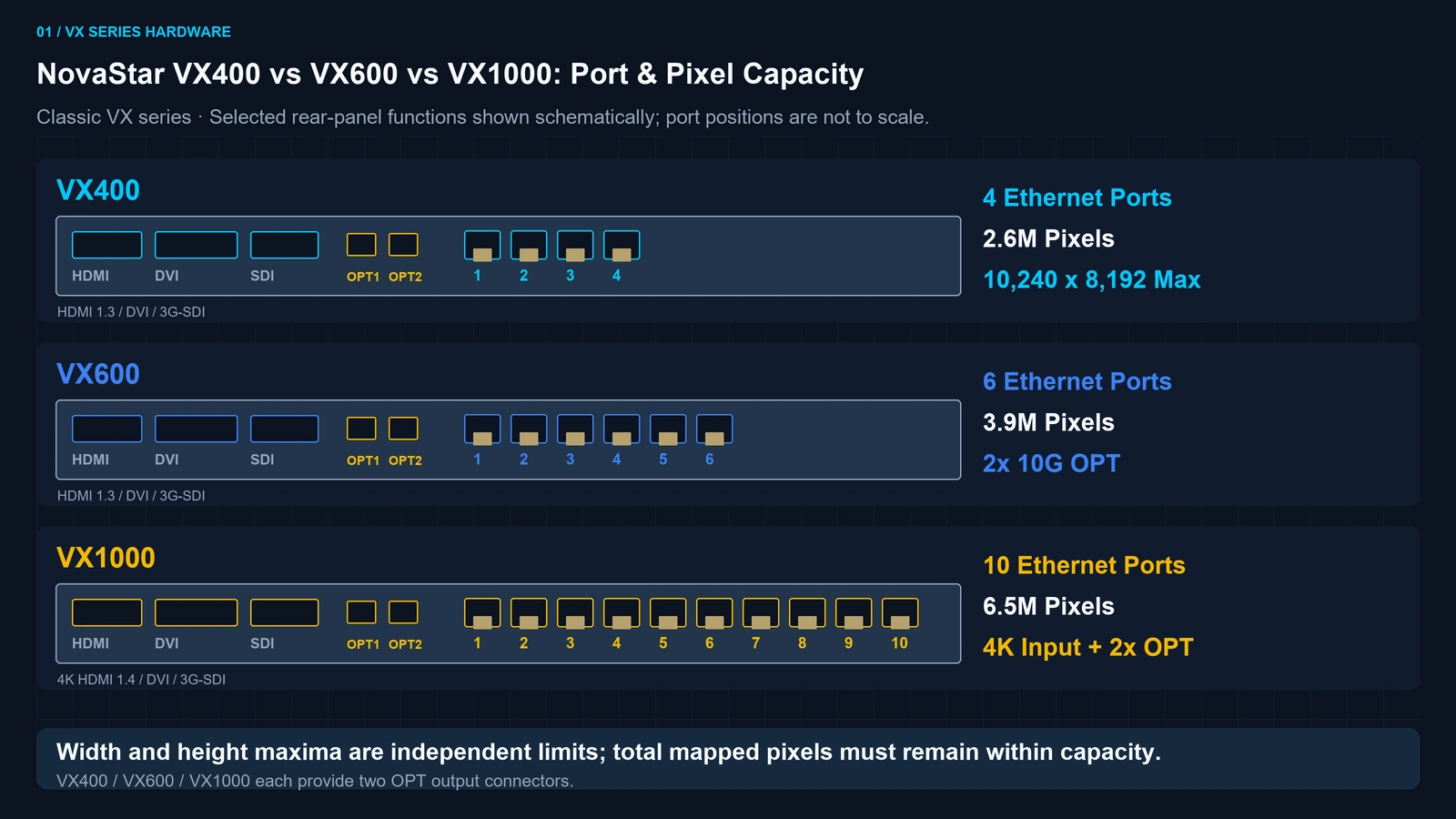
When choosing a NovaStar all in one controller for a modular rental or fixed LED video wall, the core difference between the NovaStar VX1000, NovaStar VX600, and NovaStar VX400 comes down to total pixel loading capacity, Gigabit Ethernet output port count, and optical fiber redundancy: the VX400 drives up to 2.6 million pixels across 4 Ethernet ports, the VX600 drives up to 3.9 million pixels across 6 Ethernet ports (with 2× 10G OPT fiber ports), and the VX1000 drives up to 6.5 million pixels across 10 Ethernet ports (with 2× 10G OPT fiber ports and true 4K×1K/4K×2K input processing). All three models share a 10,240-pixel maximum width and 8,192-pixel maximum height and configure natively in NovaLCT and V-Can.
For production companies ordering P3.91, P2.976, or P2.604 rental cabinets, under-sizing the video controller is one of the most expensive load-in surprises on tour. A controller that looks big enough on paper when counting raw square meters frequently runs out of ports the moment you activate 1:1 Ethernet hot backup (which cuts usable main ports in half), switch from 8-bit to 10-bit/12-bit color depth, or map an extra-wide 10m × 3m stage banner that exceeds a single port’s pixel rectangle.
This engineering guide breaks down NovaStar VX600 vs VX1000 and NovaStar VX400 vs VX600 (plus what changes on the newer NovaStar VX1000 Pro and NovaStar VX600 Pro), gives you an interactive NovaStar VX-Series Pixel Load & Ethernet Port Selector built on verified P3.91, P2.976, and P2.604 rental cabinet resolutions that exports a 1600×900 Controller Spec Sheet PNG, clarifies NovaStar VX1000 max resolution and NovaStar VX1000 price considerations, and maps directly into our NovaLCT Setup Guide and LED Video Wall Processor Guide.
1. Interactive Tool: NovaStar VX400 / VX600 / VX1000 Pixel Load & Port Selector
Before locking in a video processor for your next LED wall order, run your exact wall width, wall height, pixel pitch, color bit depth, and redundancy setting through this calculator. It computes total pixels, single-port capacity (650,000 px/port at 8-bit 60 Hz; halved when 10-bit/12-bit or port redundancy applies), minimum required Ethernet ports, and the exact VX model you need—then exports a 1600×900 Controller Spec Sheet PNG for your rack build or purchase order.
NovaStar VX400 / VX600 / VX1000 Pixel Load & Port Selector
Match your exact P3.91, P2.976, or P2.604 LED wall dimensions and redundancy plan to the right NovaStar all-in-one controller.
NovaStar VX400 fits cleanly with headroom
2. Official Spec Matrix: NovaStar VX400 vs. VX600 vs. VX1000
Based on official NovaStar VX-Series hardware specifications, all three processors combine video processing and LED sending card hardware inside a single 1U rack chassis and run in three selectable operating modes (Video Controller, Fiber Converter, and Bypass). The differences lie in how many pixels, Ethernet trunks, and high-resolution video layers each box can drive:
| Specification | NovaStar VX400 | NovaStar VX600 | NovaStar VX1000 |
|---|---|---|---|
| Max Loading Capacity (8-bit, 60 Hz) | 2.6 million pixels | 3.9 million pixels | 6.5 million pixels |
| Gigabit Ethernet Outputs | 4 ports | 6 ports | 10 ports |
| Max Output Width / Height | 10,240 px W / 8,192 px H | 10,240 px W / 8,192 px H | 10,240 px W / 8,192 px H |
| 10G Optical Fiber Ports (OPT) | 1× 10G OPT (model revision dependent) | 2× 10G OPT (OPT1 & OPT2) | 2× 10G OPT (OPT1 & OPT2) |
| Key Video Inputs | HDMI 1.3, DVI, 3G-SDI, OPT | HDMI 1.3, DVI, 3G-SDI, OPT | HDMI 1.4 (up to 4K×1K@60 / 4K×2K@30), DVI, 3G-SDI, OPT |
| Hot Backup Support | Port, device & input backup | Port, device & input backup | Port, device & input backup |
| Control Software | NovaLCT & V-Can | NovaLCT & V-Can | NovaLCT & V-Can |
| Best Rental Wall Sweet Spot | Small indoor/church walls (≤ 20 m² P3.91) | Mid-size concert/corporate walls (≤ 45 m² P3.91) | Large touring stages, fine-pitch P2.6 walls & 1:1 backup rigs |
3. Real-World P3.91 & P2.604 Wall Sizing: Where VX400, VX600, and VX1000 Hit Their Limits
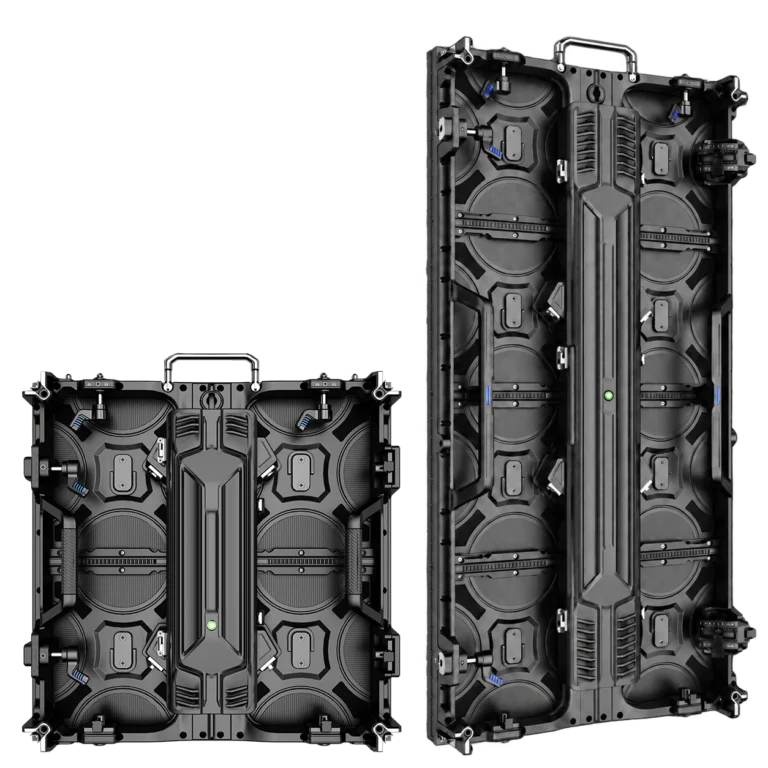
Numbers like "3.9 million pixels" mean nothing until you translate them into actual rental cabinets. Using our verified P3.91 500×1000 mm (128×256 px) and Outdoor Rental LED Display Series (P2.976 at 168×336 px and P2.604 at 192×384 px), here is what each controller actually carries in production—both without backup and with 1:1 single-unit port backup:
| Rental LED Wall Example | Native Resolution | Total Pixels | Main Ports Needed (8-bit) | With 1:1 Port Backup | Exact Controller Choice |
|---|---|---|---|---|---|
| P3.91 4m × 2.5m (10 m²) | 1024 × 640 | 0.66M | 2 ports | 4 ports | VX400 fits even with 1:1 backup |
| P3.91 6m × 3.5m (21 m²) | 1536 × 896 | 1.38M | 3 ports | 6 ports | VX400 single / VX600 with 1:1 backup |
| P3.91 8m × 4m (32 m²) | 2048 × 1024 | 2.10M | 4 ports | 8 ports | VX400 single / VX1000 with 1:1 backup |
| P2.604 6m × 3.5m (21 m²) | 2304 × 1344 | 3.10M | 6 ports | 12 ports | VX600 single / 2× VX600 or 2× VX1000 dual backup |
| P2.604 8m × 4m (32 m²) | 3072 × 1536 | 4.72M | 9 ports | 18 ports | VX1000 single / 2× VX1000 dual backup |
Notice why NovaStar VX600 vs VX1000 is the single most common decision for touring rental companies: an 8m × 4m P3.91 stage backdrop (32 m²) only needs 4 main ports, so buyers assume a VX400 or VX600 is enough. The instant a corporate client demands redundant signal loops on every column, the required port count jumps to 8—which pushes the build straight onto a NovaStar VX1000. To calculate exact cabinet weight, flight cases, and power draw alongside your controller, pair this table with our LED Wall Calculator.
4. NovaStar VX1000 Max Resolution, 4K Inputs & VX Pro Upgrades
Is the NovaStar VX1000 True 4K?
This question comes up on nearly every corporate AV quote. A standard NovaStar VX1000 accepts 4K×1K@60 Hz and 4K×2K@30 Hz over HDMI 1.4 (while 3840×2160@60 Hz totals 8.29M pixels—above the 6.5M pixel ceiling of 10 Gigabit ports). That means the VX1000 excels at ultra-wide stage banners (like 3840×1080@60 Hz = 4.15M pixels) and full-HD-plus P2.6 walls, whereas a true 3840×2160@60 Hz canvas requires either two cascaded VX1000 units or a dedicated 4K sending box.
Standard VX Series vs. NovaStar VX1000 Pro & VX600 Pro
When evaluating NovaStar VX1000 Pro and NovaStar VX600 Pro against the standard VX series, the pixel capacity and Ethernet port counts remain identical (6.5M / 10 ports on VX1000 Pro and 3.9M / 6 ports on VX600 Pro). What the Pro generation upgrades is front-end video processing: true HDMI 2.0 4K@60 Hz inputs, 12G-SDI support on higher tiers, expanded multi-layer PIP windows, USB media playback, and upgraded low-latency processing pipelines. If your shows feed HDMI 2.0 4K media servers (Resolume, Disguise, Watchout) directly into the processor without an external switcher, the Pro line removes adapter headaches; if you run standard 1080p60/4K×1K60 corporate switchers, standard VX600/VX1000 remains the highest-ROI choice.
5. Three Load-In Mistakes That Break VX-Series Signal Maps
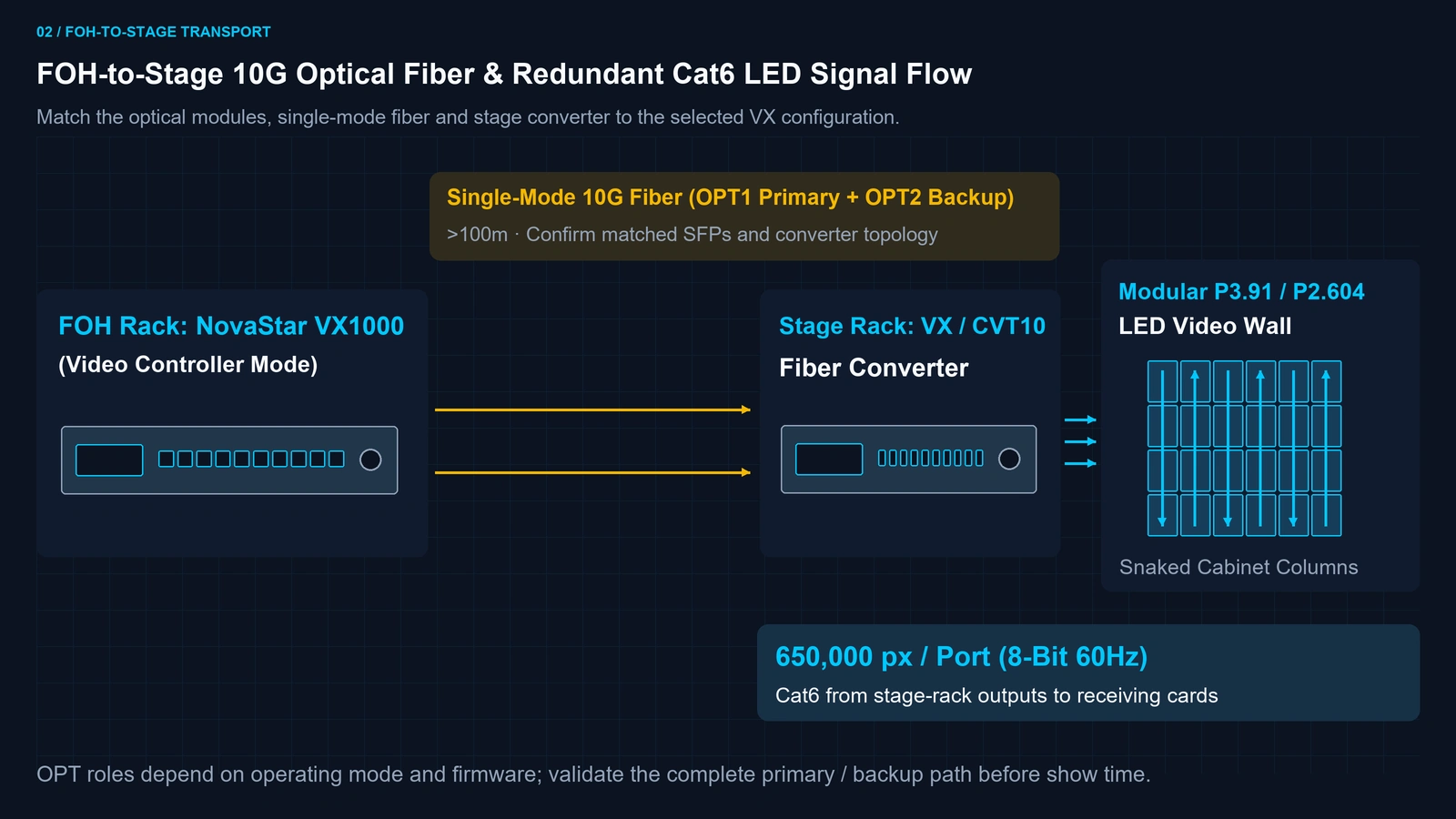
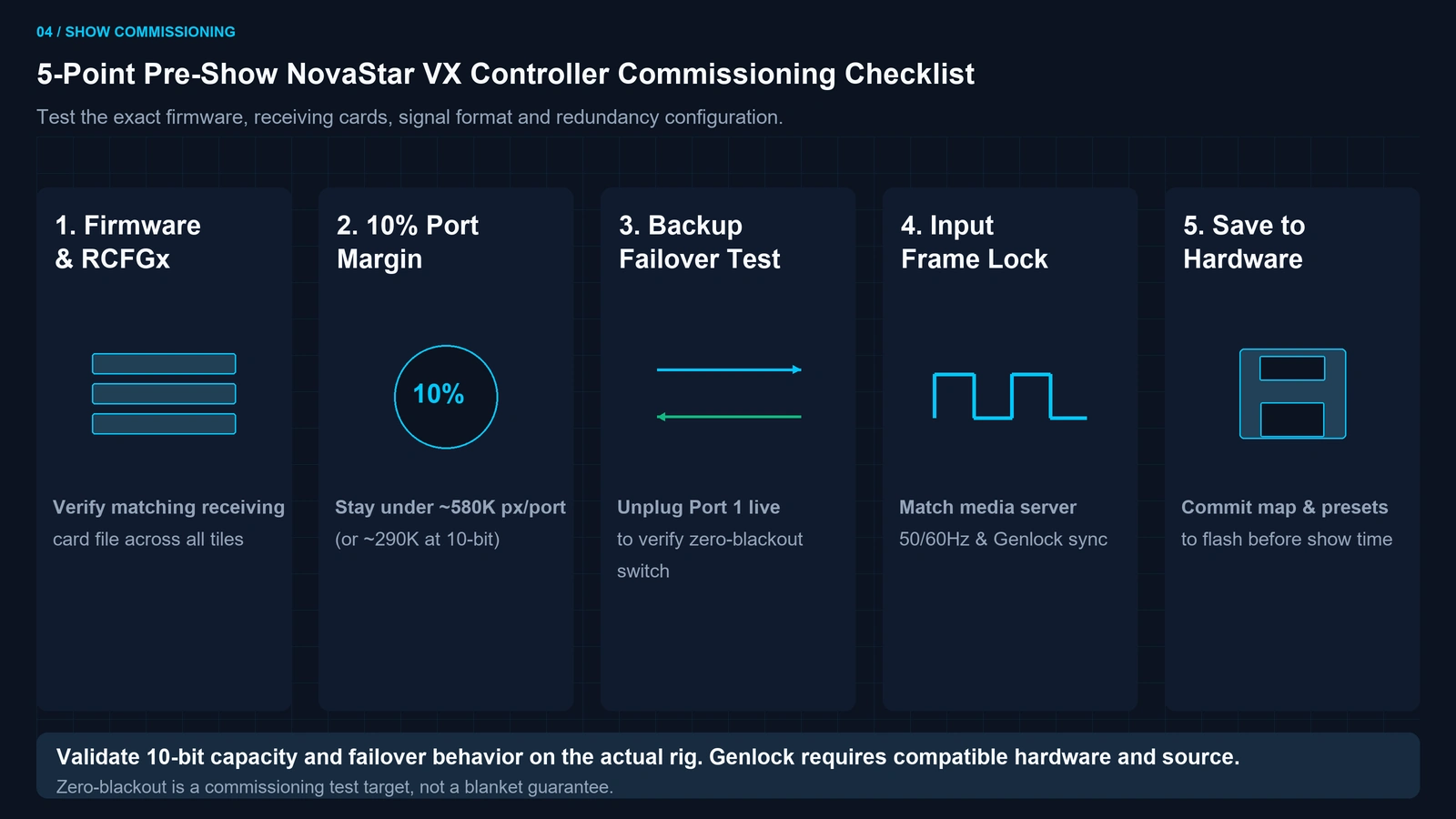
- Ignoring Single-Port Rectangular Capacity: Every Gigabit Ethernet port on a VX400, VX600, or VX1000 caps at 650,000 pixels (8-bit 60 Hz)—and every cabinet column must be routed cleanly without exceeding that port's bounding rectangle. Never run 640,000 pixels on Port 1 and assume an extra half-column will squeeze in; leave a 10% buffer (~580,000 px/port) so cabinet snaking stays symmetric and fast to troubleshoot.
- Forgetting the 10-Bit / 12-Bit Capacity Halving Rule: Switching a receiving card and VX processor from 8-bit to 10-bit or 12-bit HDR color depth cuts per-port pixel capacity roughly in half (~325,000 px/port). A wall that fits comfortably on 4 ports in 8-bit suddenly requires 8 ports in 10-bit.
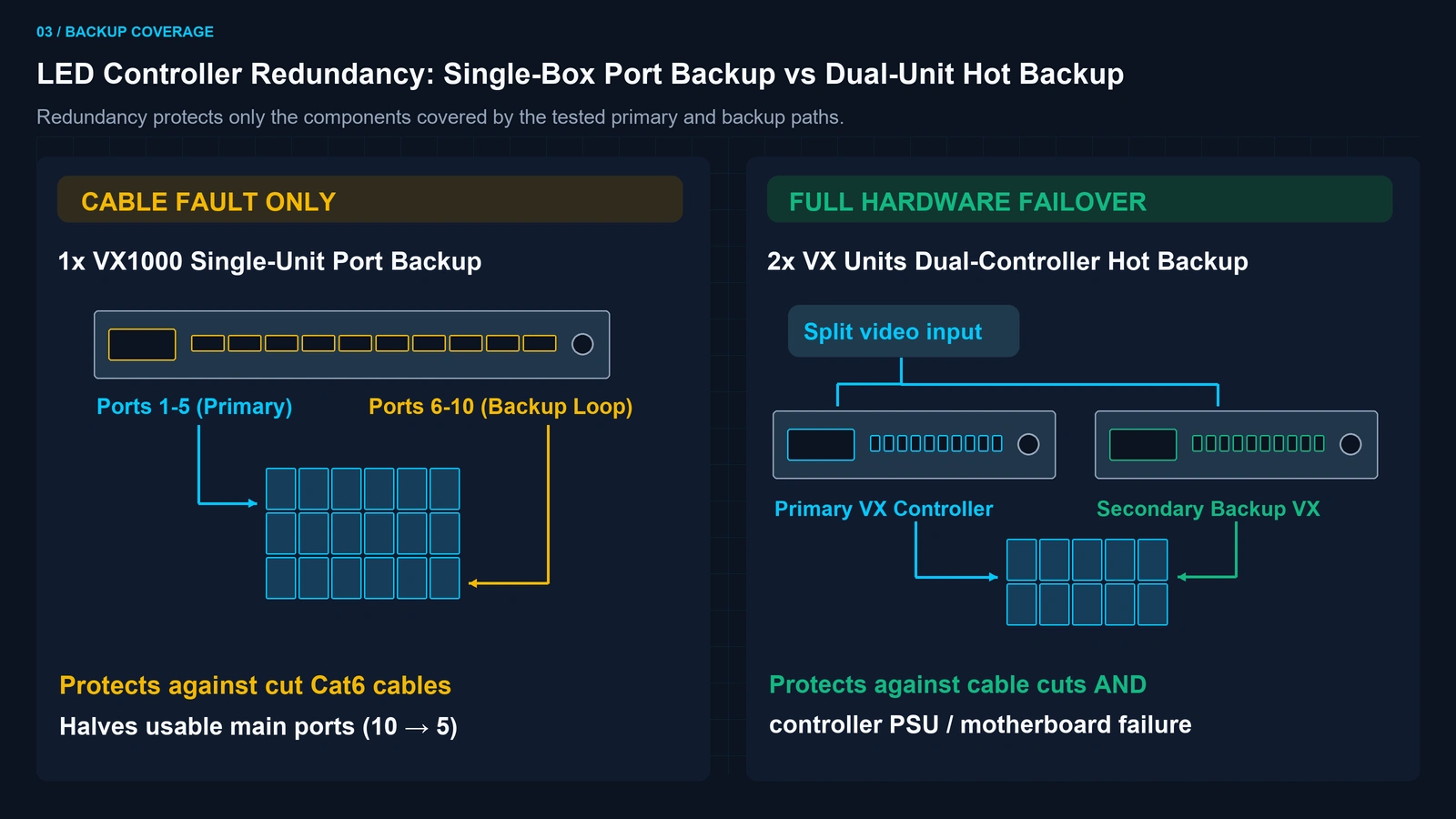
- Confusing Single-Box Port Backup with True Device Backup: Connecting Ports 1–5 as primary and Ports 6–10 as backup on one NovaStar VX1000 protects against a severed stage Cat6 cable, not against a dead controller power supply. For mission-critical broadcasts and headline festivals, run two identical VX units in Primary + Hot Backup mode so a power or motherboard fault switches over cleanly in milliseconds. See our NovaLCT Setup Guide for exact step-by-step backup configuration and NovaStar VX1000 manual port mapping.
6. NovaStar VX1000 Price, Genuine Sourcing & Bundle Strategy
Buyers researching NovaStar VX1000 price often see wide spread across online listings because street quotes vary by authorized regional warranty, Pro vs. Standard revision, included 10G SFP optical modules, and flight-case rack integration. Rather than sourcing a standalone unconfigured controller from an unknown gray-market reseller, rental companies save days of commissioning time by ordering their NovaStar VX400, VX600, or VX1000 pre-matched with their LED cabinets—so the factory pre-loads the verified .rcfgx receiving card files, tests every Ethernet port against the real wall during aging burn-in, and ships matched Cat6/fiber trunks in the same export crate.
7. Real Hardware Reference: Front-Panel Access & 10-Bit Capacity Check
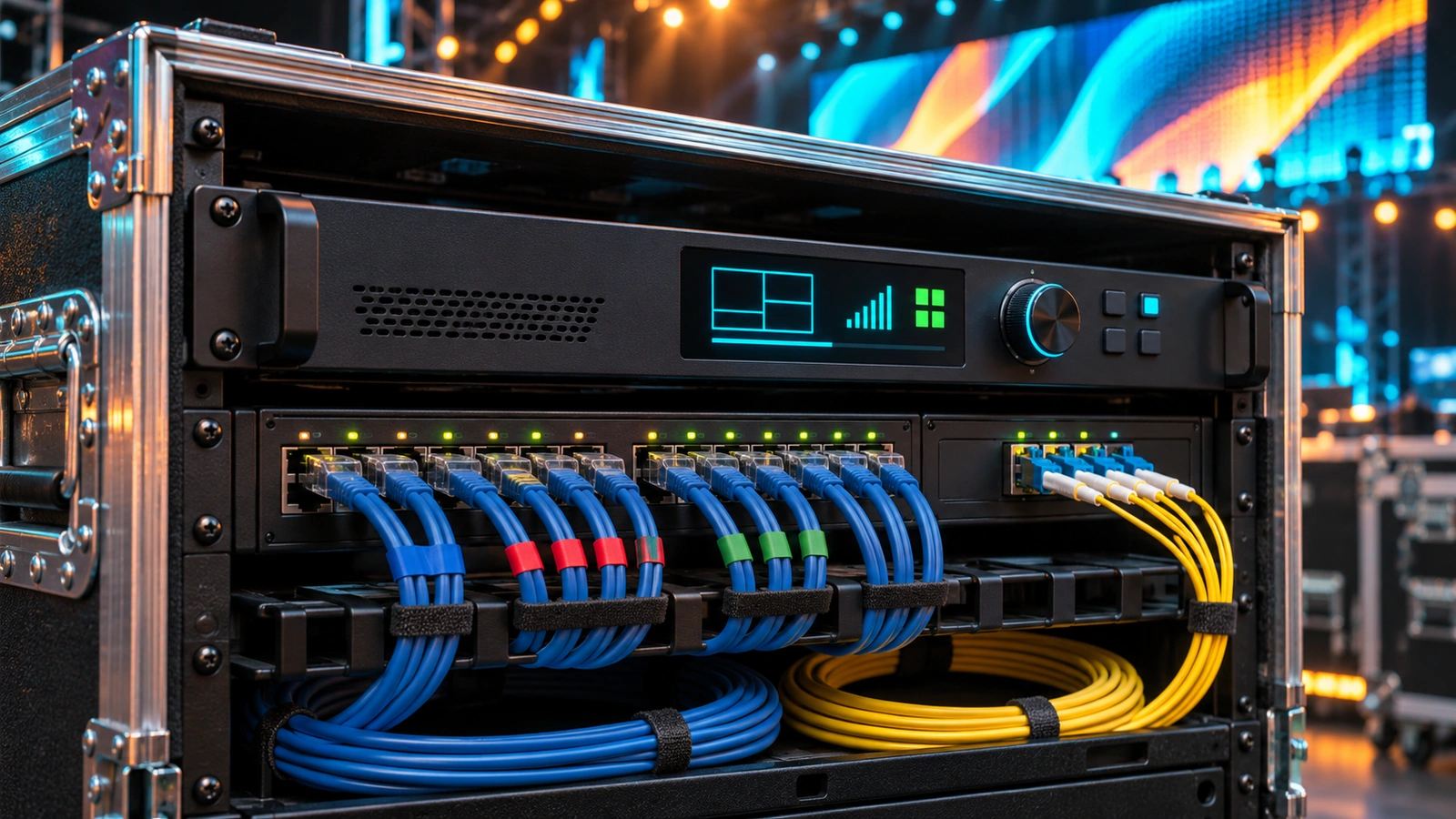
Basic spec comparisons stop at headline 8-bit pixel totals (2.6M / 3.9M / 6.5M). Before locking your order, verify two real-world hardware rules: switching from 8-bit to 10-bit/12-bit HDR cuts per-port Gigabit capacity roughly in half (from ~650,000 pixels down to ~320,000 pixels per Ethernet port), and keeping direct front-panel LCD and preset-button access in your FOH rack speeds emergency input failover during live events.

8. Frequently Asked Questions: NovaStar VX1000 vs VX600 vs VX400
What is the main difference between NovaStar VX600 and VX1000?
The NovaStar VX600 drives up to 3.9 million pixels across 6 Gigabit Ethernet ports, while the NovaStar VX1000 drives up to 6.5 million pixels across 10 Gigabit Ethernet ports and adds higher-bandwidth 4K HDMI 1.4 input support. Both include dual 10G optical fiber ports and 10,240 x 8,192 max dimensions.
How many pixels per Ethernet port can a NovaStar VX1000 handle?
Each Gigabit Ethernet port on the VX400, VX600, and VX1000 supports up to 650,000 pixels at 8-bit 60 Hz. When running 10-bit or 12-bit color depth, per-port loading drops by roughly half to approximately 325,000 pixels per port.
Is the NovaStar VX1000 true 4K at 60Hz?
The standard NovaStar VX1000 supports 4K x 1K at 60 Hz and 4K x 2K at 30 Hz via HDMI 1.4, with a total output ceiling of 6.5 million pixels (below full 8.29M 4K60). The newer VX1000 Pro adds HDMI 2.0 4K60 input processing while maintaining 6.5 million output pixels.
How big of a P3.91 LED wall can a NovaStar VX400, VX600, or VX1000 run?
In 8-bit mode without port backup, a VX400 handles roughly 30 to 35 square meters of P3.91, a VX600 handles roughly 50 to 55 square meters, and a VX1000 handles up to roughly 85 to 90 square meters. Enabling 1:1 single-unit port backup cuts those areas in half.
What is the difference between NovaStar VX400 vs VX600?
The VX400 provides 4 Ethernet ports (2.6M pixels), whereas the VX600 provides 6 Ethernet ports (3.9M pixels) and dual 10G optical fiber ports (OPT1 and OPT2) for long FOH-to-stage fiber transmission and redundant fiber loops.
What upgrades come with the NovaStar VX1000 Pro and VX600 Pro?
The VX600 Pro and VX1000 Pro keep the same 6-port/3.9M and 10-port/6.5M output capacities as the standard VX units, but add upgraded HDMI 2.0 4K60 input interfaces, expanded multi-layer video windowing, USB playback, and improved low-latency processing.
Can NovaStar VX controllers use NovaLCT and V-Can software?
Yes. All VX400, VX600, and VX1000 controllers work with NovaLCT for screen mapping, receiving card configuration, calibration, and hot backup setup, as well as V-Can for live multi-layer preset switching.
When should I buy two VX controllers instead of one VX1000?
Order two identical VX units whenever your show requires true hardware hot backup (protecting against a controller PSU failure, not just a broken Ethernet cable) or whenever your combined pixel load exceeds 10 Gigabit ports in 8-bit or 10-bit mode.
9. Need a Pre-Configured LED Wall + NovaStar VX Bundle?
Ordering your NovaStar VX400, VX600, or VX1000 directly alongside your P3.91, P2.976, or P2.604 rental cabinets ensures your .rcfgx files, port snaking diagram, and fiber backup trunks arrive pre-tested from our aging floor—zero guesswork on show day.
Send your screen dimensions, pixel pitch (P2.604 / P2.976 / P3.91), video input sources, and backup requirement via our Contact Page, or explore our Rental LED Displays, P3.91 500×1000 Outdoor LED Display, and NovaLCT Setup Guide.