Choose Art-Net or sACN by checking what your console, receivers and fixtures actually support, then how the show distributes its universes. Art-Net can be useful where device discovery and supported remote management belong in the workflow. sACN offers source priority and multicast distribution, which can be useful when several receivers need the same universe. Both can carry lighting levels over an IP network.
Neither name guarantees a faster, simpler or more reliable show. The practical decision includes the protocol version, output settings, receiver behavior, fixture mode and the path from the console to the light.
Art-Net vs sACN at a glance
| Question | Art-Net | sACN |
|---|---|---|
| What does it carry? | DMX lighting data, with discovery and management messages defined in the protocol | Streaming DMX lighting levels using ANSI E1.31, part of the ACN family |
| How is level data delivered? | Current Art-Net 4 ArtDmx requirements use unicast to subscribed receivers; older implementations may offer broadcast behavior | Commonly multicast; supported equipment can also use unicast |
| How are sources handled? | Check the receiver's supported merging and source limits | Source priority is part of the system; check receiver support and any merging rules |
| Does it manage fixtures? | Supported Art-Net/RDM equipment can provide a management path | E1.31 level transport does not by itself provide RDM fixture management |
| Can it control ordinary DMX lights? | Through an Art-Net-to-DMX gateway | Through an sACN-to-DMX gateway |
| What should a buyer verify? | Exact implementation, discovery, destination settings, output mapping and receiver functions | Exact implementation, multicast/unicast settings, priority, output mapping and receiver functions |
Art-Net is published by Artistic Licence on a royalty-free basis subject to its conditions; that is different from calling it open-source software. sACN means Streaming ACN. It is related to the wider ACN architecture, but the two names do not describe identical scopes. The current E1.31 edition is listed in ESTA's published standards directory.
If DMX itself is unfamiliar, start with our DMX lighting explanation. The comparison here concerns how that control data travels between network devices.
Decide where Ethernet ends and physical DMX begins
A network protocol needs a receiver that understands it. There are two common paths.
Direct network control: the console or lighting software sends data through an Ethernet switch to a fixture with the required network receiver fitted and enabled. Confirm the ordered hardware, supported protocol and firmware before choosing this route.
Network-to-DMX control: the console sends network data to a gateway, also called a DMX node. The node receives selected universes and outputs physical DMX to the fixtures. Those fixtures can remain ordinary DMX-controlled lights.
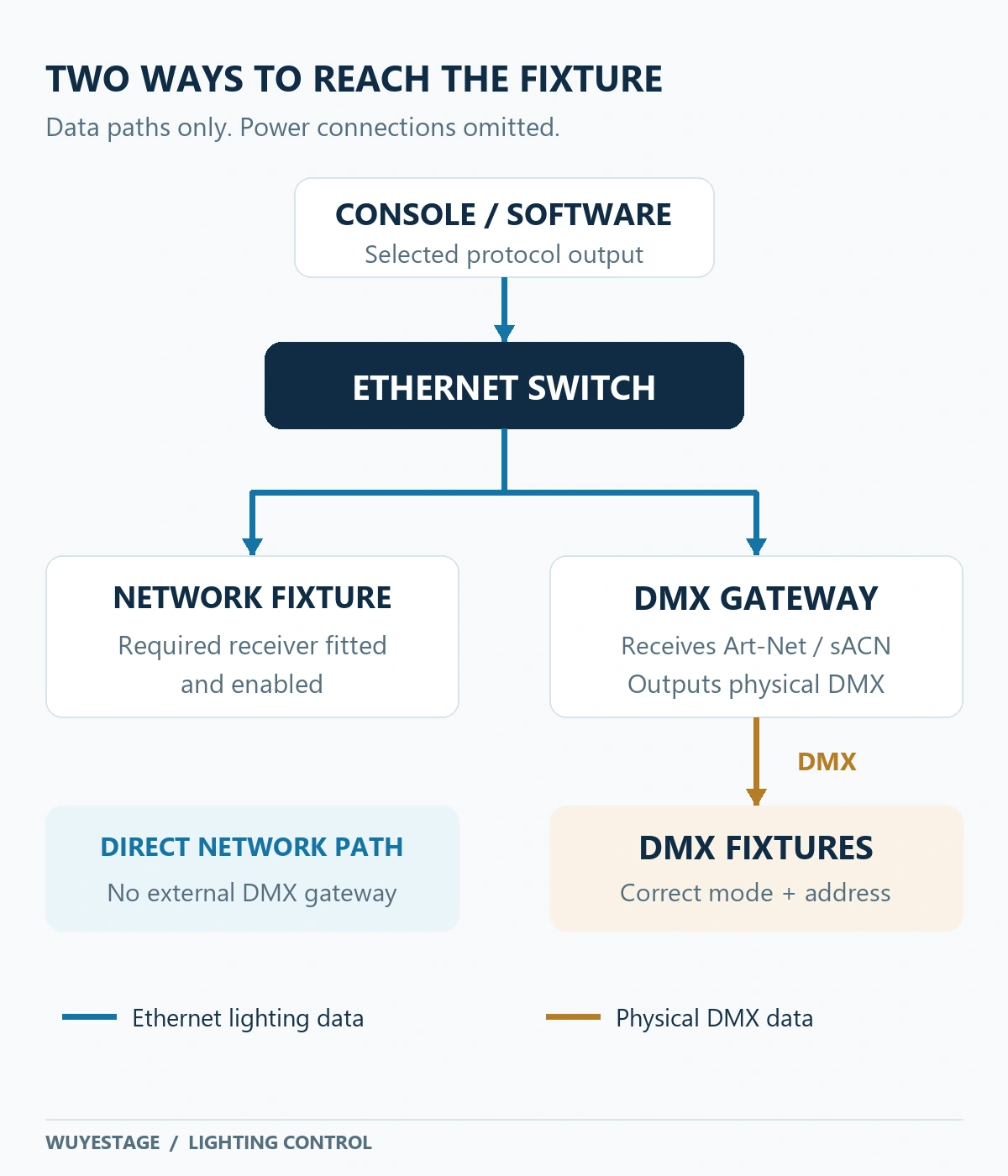
A passive connector adapter does not translate Art-Net or sACN into DMX. Also, an RJ45-style socket alone does not establish that a device accepts Ethernet lighting data. Identify the port's documented function.
Node output count depends on the universes and physical branches required, not simply the number of fixtures. Several ports may reproduce the same universe for separate branches. That gives more connections, not more independent channel capacity. Check each node's mapping options and output limits.
Unicast, multicast and broadcast: compare the actual settings
Unicast sends data to a particular destination
With unicast, the sender addresses a particular receiver. If two receivers need the same universe, the sender may need to send a copy to each destination. This can be practical when destinations are known and stable, especially when different receivers need different universes.
Unicast is not exclusive to Art-Net. For example, ETC's Eos protocol settings provide sACN unicast destinations as well as multicast controls. The available controls and limits belong to the specific console and software version.
Multicast distributes a universe to a receiving group
With sACN multicast, receivers subscribe to the group associated with a universe. It can avoid sending a separate copy from the source to every receiver that needs identical data.
That benefit depends on the network. A switch that floods multicast onto irrelevant ports removes part of the advantage. Check multicast handling, IGMP snooping and the appropriate querier arrangement with the network designer. Do not assume that buying a managed switch or enabling one checkbox completes the design. ENTTEC's network guidance explains why switch behavior, source links and receiver processing all matter.
If each receiver needs a different universe, compare that actual traffic pattern rather than assuming multicast must always use less bandwidth. Source port load, uplinks and receiver limits matter alongside the protocol label.
“Art-Net is broadcast” is an incomplete rule
Original Art-Net used broadcast for level data. Current Art-Net 4 specification revision 1.4dp, dated 23 October 2025, requires ArtDmx level packets to be unicast to subscribers and does not permit broadcasting those packets. This is distinct from discovery or other management traffic.
Older devices and software may still expose broadcast settings. Record the actual implementation and output mode when integrating them; a current specification does not silently update installed equipment. Artistic Licence's protocol history explains the move from early broadcast operation toward unicast.
For an “Art-Net multicast” setting, identify exactly which protocol and packet type the product means. Do not infer that current ArtDmx level data uses multicast, or confuse an Art-Net management function with sACN level transport.
Universes, fixture modes and output mapping must agree
A DMX universe provides up to 512 slots, commonly called channels. One fixture may occupy many of them. A network carrying several universes does not turn a single universe into thousands of channels.
The often-quoted Art-Net figure of 32,768 refers to theoretical universe address capacity, not channels inside one universe. Nor does it mean a particular console, licence, node or fixture supports that many outputs. As one equipment-specific example, the Hog 4 networking manual lists output capabilities and licensing conditions for its platforms. Confirm equivalent limits for your own system.
Keep three references separate on the patch sheet:
- Console universe: the universe used inside the show file.
- Network output universe: the protocol-specific destination selected by the output mapping.
- Receiver or node output: the universe received by the fixture, or mapped to a physical DMX port.
These labels need not show the same number. Art-Net interfaces may expose Net/Sub-Net/Universe fields or a combined number; equipment also differs in its display conventions. Copying “Universe 1” between menus is not a substitute for confirming the map. Eos, for example, documents separate starting-universe and output-universe controls in its protocol settings.
Worked example: four fixtures in a 148-channel mode
Assume four fixtures each occupy 148 consecutive slots and each fixture stays within one universe. Three use 444 slots; four would need 592, exceeding 512. A suitable patch is:
| Fixture ID | Selected mode | Logical universe | Start address | Occupied slots |
|---|---|---|---|---|
| F1 | 148CH | U1 | 1 | 1–148 |
| F2 | 148CH | U1 | 149 | 149–296 |
| F3 | 148CH | U1 | 297 | 297–444 |
| F4 | 148CH | U2 | 1 | 1–148 |
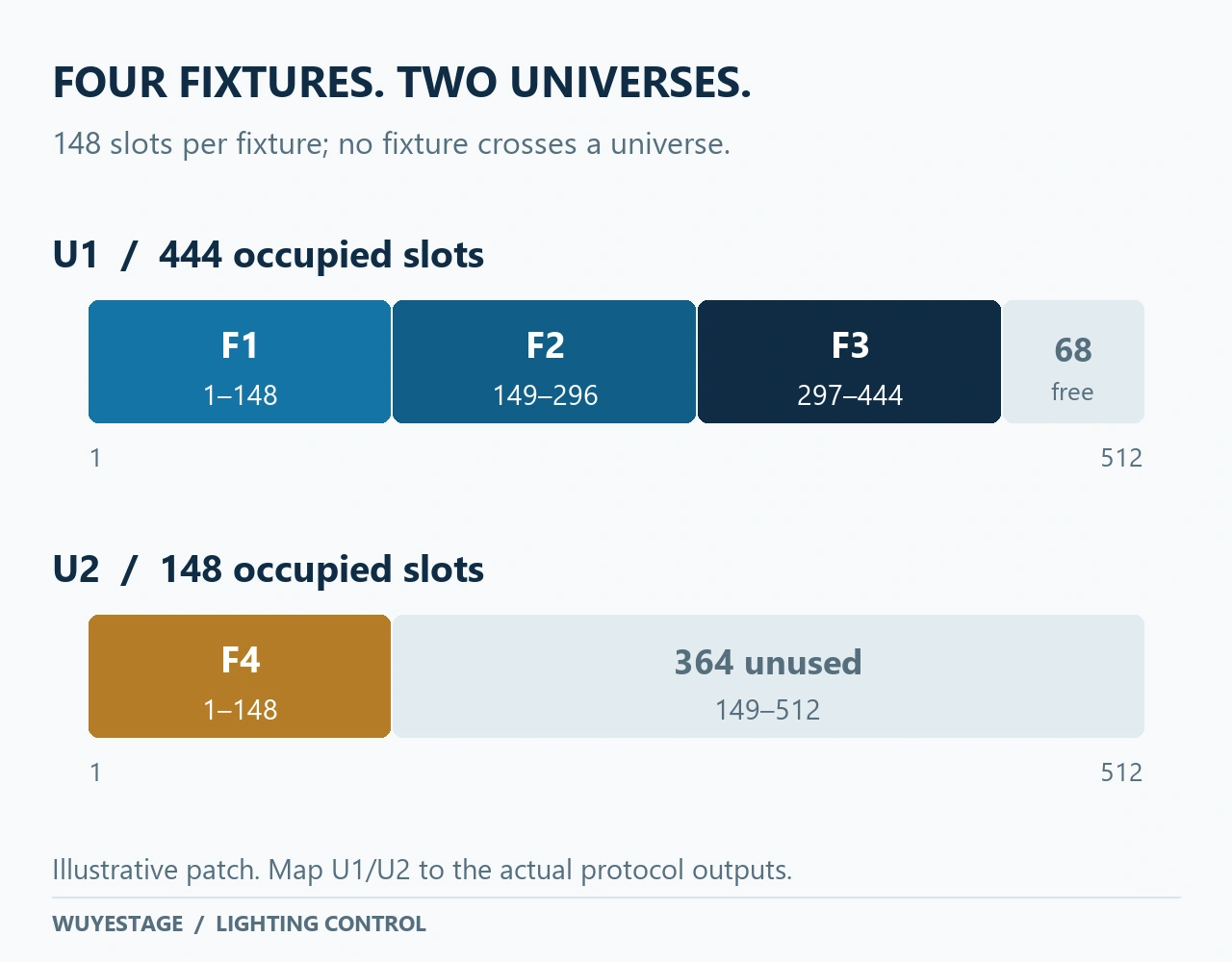
U1 has 68 unused slots and U2 has 364. This is an addressing example, not a bandwidth measurement or a tested installation. Map the logical universes to the actual protocol outputs and receiver settings. If using ordinary single-universe DMX output ports, provide outputs for both universes; any additional branches are a separate physical-distribution decision.
Changing the fixture mode changes the patch. Match the console personality, fixture mode and channel chart before testing. Our DMX channel and address guide covers the underlying address calculations.
Source priority helps only when the receivers follow the plan
sACN priority helps receivers decide which source should control a universe. A higher-priority source can override a lower-priority one, including when its requested lighting levels are lower. Devices may also offer per-address priority, but that needs compatible implementation at both ends.
For example, a project could assign its main source priority 120 and a standby source priority 100. Those are illustrative settings, not a universal preset. The team still needs to verify what the receiver does when the main source disappears, returns or conflicts with another source. ETC's network definitions explain source priority, universe discovery and receiver behavior.
Priority does not create a backup show file, synchronize two consoles or test failover. Likewise, a receiver's Art-Net merging option is not automatically a complete backup system. Agree which source controls which outputs, then test the intended transitions.
Both protocols use UDP for their lighting data. Choosing sACN does not add automatic retransmission that guarantees delivery. Judge latency and stability on the actual system, including the console, receiver, network and fixture response, rather than declaring a winner from the protocol name.
Device discovery and RDM are different from level control
Being able to dim a fixture does not prove that you can discover it, change its mode remotely or read its status.
Art-Net uses ArtPoll and ArtPollReply for device discovery and also defines RDM-related messages. These functions are useful only when the controller, gateway, intervening equipment and fixture support the required functions. A fixture's “RDM” label does not promise every possible management feature.
sACN Universe Discovery identifies sources and the universes they advertise; it does not provide a list of all connected fixtures. E1.31 level transport is also distinct from RDMnet, the separate device-management protocol.
Art-Net management and sACN level control can have complementary roles in supported equipment, as described in the official Art-Net background. Document those roles. Sending both protocols to the same output without understanding source selection or merging can produce an unintended result.
Choosing Art-Net or sACN for your project
| Your situation | Practical direction | Confirm before committing |
|---|---|---|
| Existing equipment supports one of the protocols well | Start with that supported path | Exact console output, receiver version and required functions |
| Several receivers need the same universe | Evaluate sACN multicast | Multicast behavior, subscriptions, switch configuration and uplinks |
| Receivers need separate, known destinations | Evaluate supported unicast operation | Destination addresses, discovery or reservations, and source output capacity |
| The project needs source priority | Evaluate sACN priority behavior | Receiver handling, equal-priority behavior and the actual takeover test |
| Remote discovery or fixture management matters | Evaluate the supported Art-Net/RDM path or a separately specified management system | Functions available across the whole chain |
| Existing fixtures accept physical DMX only | Use a suitable network-to-DMX node | Protocol input, output mapping, physical branches and fixture patch |
Small systems can use sACN, and large systems can use Art-Net. The useful distinction is the required behavior and equipment support, not an arbitrary fixture count.
A fixture specification can change the whole connection plan
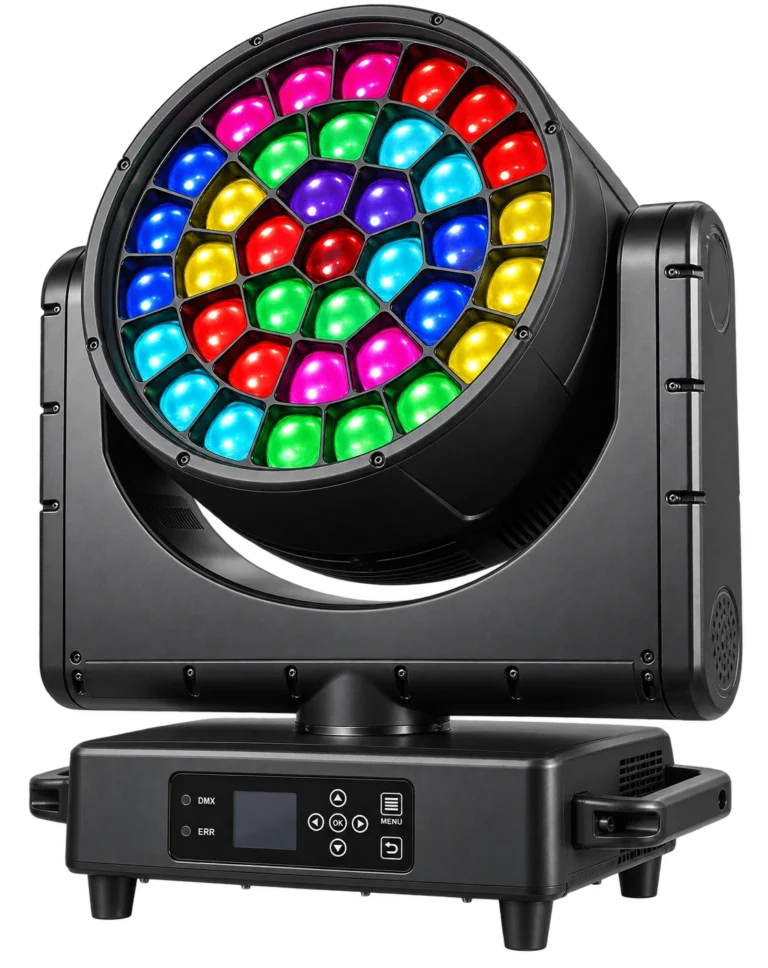
WUYESTAGE's RG-370 37×40W IP65 moving head lists standard 21/22/35/36CH modes and pixel 111/148CH modes. ArtNet, sACN and KingNet network functions are order options. Specify the required network configuration rather than assuming it is included with every fixture.
For that fixture, choose the programming mode and required connection path together. A higher-channel pixel mode changes the patch; a network option changes which direct connection may be available. Ask for the channel chart, console personality and documentation that match the supplied configuration. KingNet is a separate listed option, not another name for either protocol in this comparison.
Test the complete path before accepting the system
Begin with one source, one receiver path and a known fixture mode. Establish that baseline before adding other sources or reproducing the full show load.
| Check | Evidence to retain |
|---|---|
| Correct output | Console/software version, selected network interface, enabled protocol and output licence/capacity |
| Correct delivery | Destination or multicast settings, receiver configuration and relevant switch settings |
| Correct patch | Console-to-network universe map, node port assignment, fixture mode, start address and matching personality |
| Useful fixture response | Representative dimming, color, movement and required pixel cues under the intended workload |
| Predictable source changes | Agreed priority/merge behavior, main-source loss, return and power-cycle observations |
| Recoverable configuration | Show file, node/receiver settings, fixture versions and a dated patch record |
If a fixture is unresponsive, trace output, receiver mapping and fixture mode before replacing it or changing protocols. For intermittent problems, compare a single-source baseline with the full system and inspect the affected data path. Do not change several unrelated settings at once and then lose track of what solved the problem.
For fixture selection or a batch quotation, send WUYESTAGE the console/software model and version, required protocol, connection path, fixture quantities, channel modes, universe plan and delivery country. These details let us identify the relevant fixture configuration and documentation to confirm with the order.
Frequently asked questions
Is sACN better than Art-Net?
Neither is universally better. A sACN vs Art-Net comparison should start with compatible equipment and required behavior. Multicast distribution and source priority may favor sACN; supported discovery and management may favor an Art-Net role. Test the complete implementation.
Can I use Art-Net or sACN with my existing DMX fixtures?
Yes, through a gateway that receives the selected network protocol and outputs physical DMX. The fixtures still need the correct mode and address. Direct Ethernet control requires a fixture with the corresponding network capability.
Does sACN have to use multicast?
No. Supported equipment can send sACN unicast to specified destinations. Confirm the sender and receiver settings; multicast and unicast are delivery choices, not different fixture channel modes.
Can Art-Net and sACN run on the same network?
They can, with supported equipment and a documented design. Decide which protocol supplies levels and which provides any management functions. Avoid unintentionally driving the same output from conflicting sources.
Does a larger universe count guarantee more usable outputs?
No. Protocol address space, console licensing, network output capacity, node ports and fixture capabilities are different limits. Check all of them against the actual patch and physical distribution.