DMX channels are numbered control-data slots, not a count of connected lights. A conventional DMX universe provides up to 512 slots. A fixture’s mode determines how many it uses; its start address determines where that range begins. To control fixtures separately, give them non-overlapping ranges in the intended universe and match their modes to the console profiles.
An eight-channel fixture starting at address 1 occupies addresses 1–8. The next independently controlled eight-channel fixture can start at 9. The common mistake is to assign addresses 1, 2, 3 to three multi-channel fixtures as if each light used only one slot. Their ranges overlap before the first cue is programmed.
For rental companies and distributors, this is more than terminology. A correct patch lets technicians replace units, build repeatable show files and diagnose unexpected behavior. Before ordering equipment, confirm the exact configuration, channel modes and current channel chart. A short specification that says only “DMX512” cannot establish the console personality.
Four numbers that belong on the patch sheet
Separate these concepts before calculating any DMX channels:
| Term | Meaning | Example |
|---|---|---|
| DMX channel or slot | A numbered position carrying control data | Slot 9 contains a value sent by the controller |
| Start address | The first slot a fixture uses in the chosen mode | Address 9 with an 8CH footprint occupies 9–16 |
| Fixture mode | The selected channel layout and footprint | An 8CH mode consumes eight slots; the chart defines their functions |
| Universe | A separate block of up to 512 slots | Universe 1/address 9 and universe 2/address 9 are separate destinations |
The ESTA DMX512-A guide explains addresses, 512-channel universes and the distinction between DMX data slots and console channels. A console’s fixture number, handle or logical channel is not necessarily the transmitted DMX address. Use the console’s patch view to verify the mapping instead of relying on similar labels.
Also separate a slot’s number from its value. In ordinary DMX control, a slot carries an 8-bit value from 0 to 255. That number is interpreted through the fixture’s channel chart: it might represent a proportional level, part of a higher-resolution parameter, or a range selecting a behavior. Address 255 is not the same thing as sending value 255.
Calculate the occupied range before assigning the next fixture
Use two simple rules:
Last occupied address = start address + channel footprint −1
Next contiguous start address = start address + channel footprint
For an 8CH fixture starting at 33, the last occupied address is 33+8−1=40. The next contiguous start is 41. Leaving deliberate gaps is acceptable, but record them; the formulas describe minimum contiguous spacing, not a requirement to pack every show tightly.
The following six-fixture example uses the verified 8CH listing for the 4-in-1 configuration of RG-312 PLUS 18PCS. It demonstrates allocation only, not the function assigned to each slot.
| Fixture | Universe | Selected footprint | Start address | Occupied range |
|---|---|---|---|---|
| PAR A | 1 | 8CH | 001 | 001–008 |
| PAR B | 1 | 8CH | 009 | 009–016 |
| PAR C | 1 | 8CH | 017 | 017–024 |
| PAR D | 1 | 8CH | 025 | 025–032 |
| PAR E | 1 | 8CH | 033 | 033–040 |
| PAR F | 1 | 8CH | 041 | 041–048 |
These six units consume 48 DMX channels, not six. The next free contiguous address is 49. If the controller displays 001, 009 and 017 with leading zeros, these are still decimal addresses 1, 9 and 17.
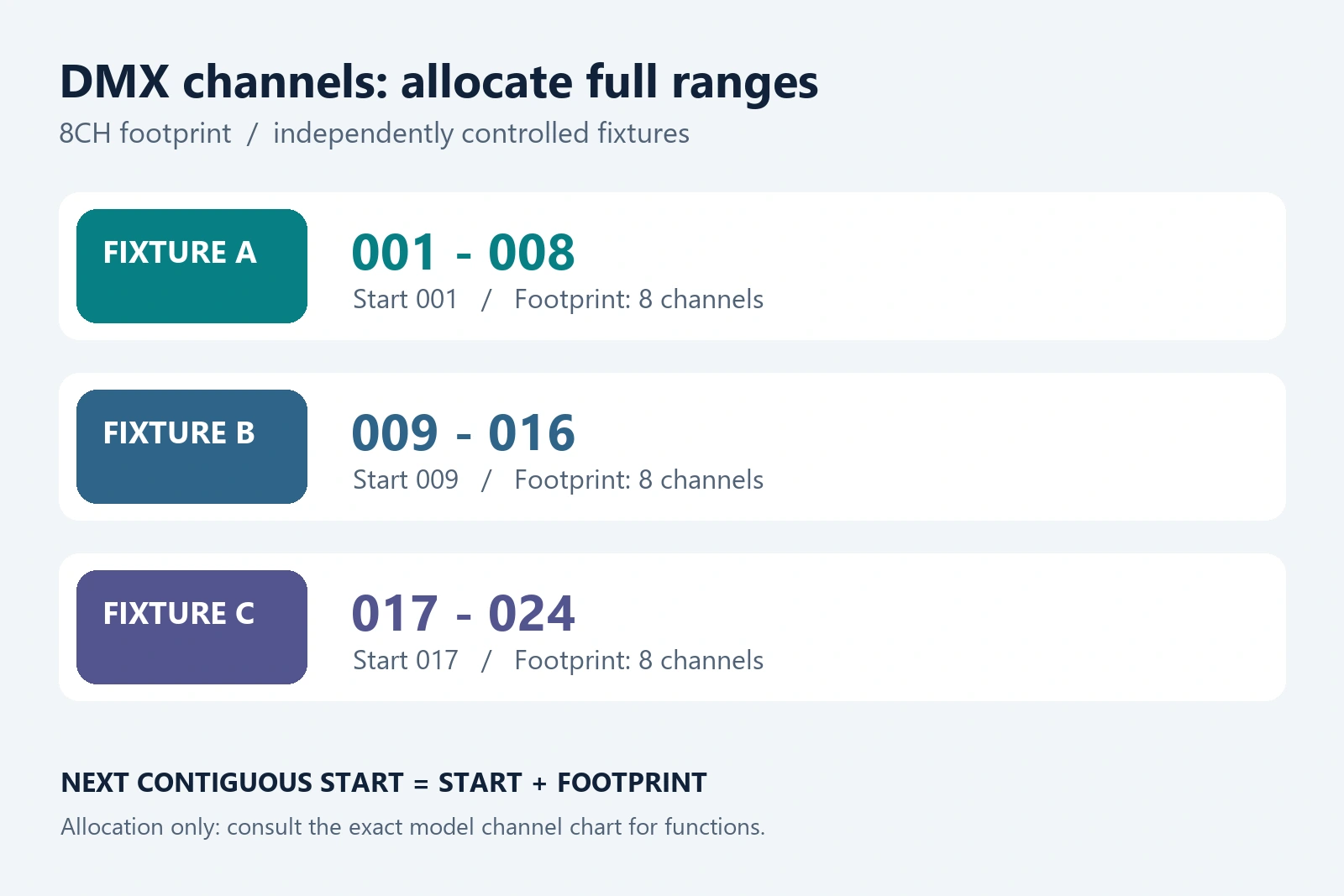
Each colored range belongs to one fixture. This is address arithmetic, not an RG-312 PLUS channel-function chart.
Keep fixture labels stable across the patch sheet, physical unit and show file. If a technician swaps PAR C, the replacement needs the same intended configuration, mode and address—not merely the same housing shape. For the broader venue workflow, use the existing theatre stage-lighting installation guide.
Why a mode change can break an otherwise correct patch
A fixture mode is a layout, not just a number. Two modes may expose different parameters, different resolutions or different orderings. Even modes with equal footprints can require different console personalities. More DMX channels may provide extra control, but they do not automatically make a fixture brighter or improve its optics.
Consider a hypothetical fixture offering 8CH and 16CH modes. Fixture A starts at 001 in 8CH mode; fixture B starts at 009. If A is switched to 16CH without repatching, it now uses 001–016 and overlaps all of B’s 009–016 range. The fixture count has not changed, but the independent-control plan has.
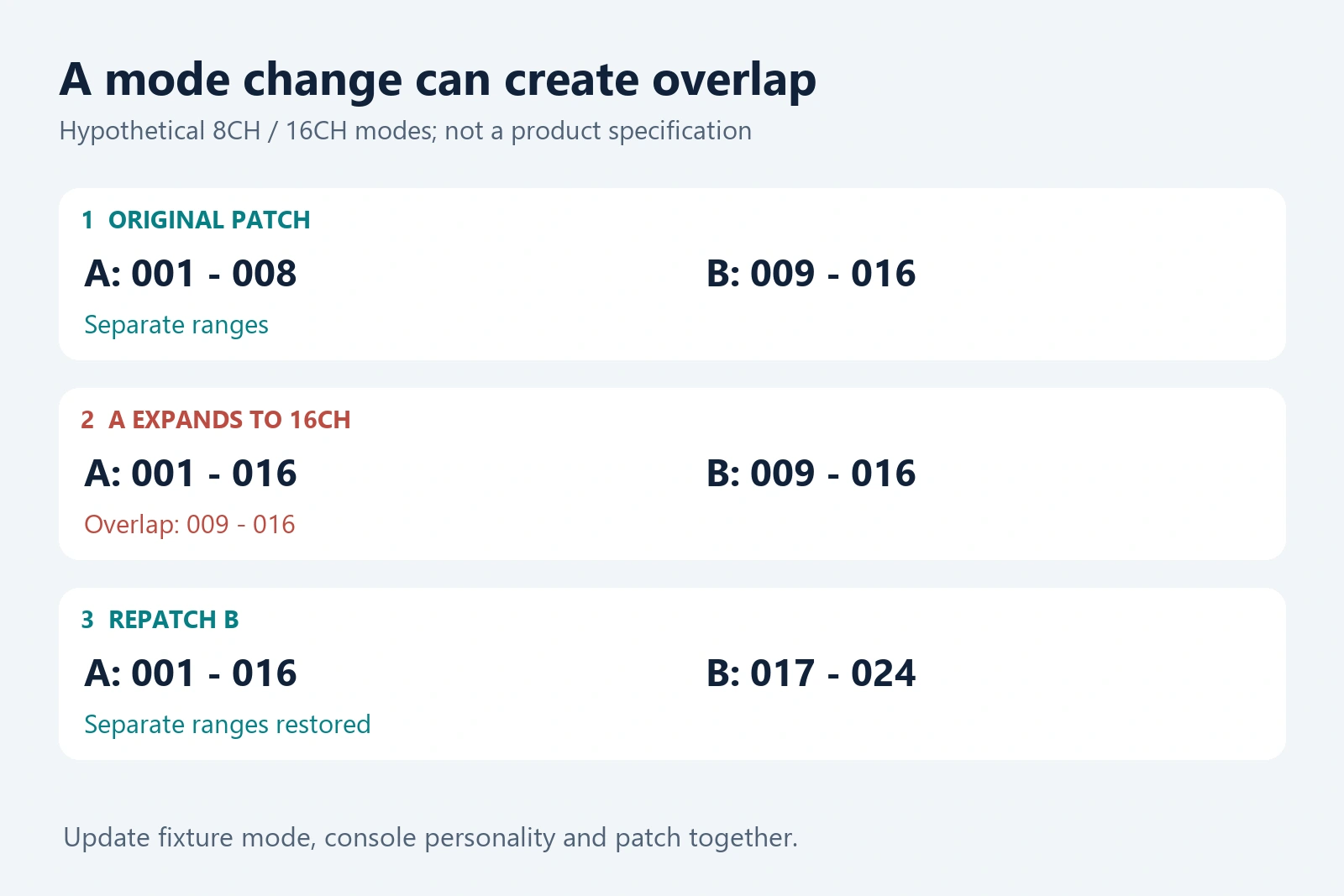
Illustrative 8CH-to-16CH modes explain the arithmetic; they are not a claimed mode pair for RG-312 PLUS 18PCS.
Resolve that example by updating A’s mode and console profile together, then moving B to a non-overlapping range such as 017–024 if B remains 8CH. Recalculate every later fixture affected by the change. Saving a show file without updating the physical fixtures, or changing the fixtures without updating the show file, leaves the system inconsistent.
For the real RG-312 PLUS 18PCS LED PAR, the current product listing states 4-in-1:8CH; 6-in-1:6/10CH. These counts are configuration-specific. They are not evidence that every purchased unit offers every listed mode. The 5-in-1 channel footprint is not established in the current master and must be requested for that ordered option.
Use this model as an 8CH allocation example when the quotation confirms its 4-in-1 configuration. Request its current channel chart and matching console profile before programming color, dimming or effects. The product name,18 LED positions and 200W listing cannot supply that missing function map.
Count universe capacity without confusing it with cable capacity
For identical fixtures packed contiguously from address 1, the theoretical address-space limit is:
Maximum fixtures per universe = floor(512 ÷ footprint)
| Footprint | Address-space maximum | Last occupied slot | Remaining slots |
|---|---|---|---|
| 8CH | 64 fixtures | 512 | 0 |
| 10CH | 51 fixtures | 510 | 2 |
| 16CH | 32 fixtures | 512 | 0 |
These are arithmetic limits, not approved wiring plans. Receiver loading, cable runs, distribution equipment and the controller’s available outputs are separate questions. Do not interpret “64 eight-channel fixtures fit in a universe” as permission to connect 64 receivers to one unsplit cable segment.
The full range must remain within the universe. An 8CH fixture can occupy 505–512; starting it at 506 would require 506–513 and does not fit this allocation. Move it to a suitable free range or another universe. Do not assume an ordinary fixture automatically continues into the next universe because the previous one is full.
For a mixed rig, add the footprints of the actual modes rather than dividing 512 by an average guessed channel count. For example, twelve 8CH PARs use 96 slots; six 16CH fixtures use another 96. A contiguous plan uses 192 slots and leaves 320. Reserving addresses for future units reduces the currently available space even though those units are not yet connected.
A controller with multiple universe labels is useful only if the intended universes can reach the rig through its configured outputs or nodes. Record the output mapping alongside the fixture addresses. Address 001 repeated on two correctly routed universes is normal; address 001 repeated unintentionally on one universe is a different problem.
Diagnose the patch before replacing a fixture
When movement, color or dimming behaves incorrectly, compare the physical fixture settings with the console patch and manufacturer chart. Start with a single known unit and a simple command, then restore the full rig. This narrows the question without guessing a defect from one unexpected cue.
| Symptom | Patch issue to check | Useful next check |
|---|---|---|
| Two fixtures respond together | Same address or overlapping ranges in the same universe | Compare both start addresses and selected footprints |
| Parameters appear in the wrong order | Incorrect mode or personality | Match the exact channel chart, version and console profile |
| A fixture does not respond | Wrong address, output mapping or operating mode | Confirm DMX mode, intended universe and signal indication; then check the data path |
| A saved show fails after a replacement | Different settings or configuration | Compare the replacement against the documented sample and patch |
These checks identify candidates, not guaranteed diagnoses. Shared addresses can be deliberate, and no response can have causes outside the patch. If the settings agree but the behavior still differs, investigate the signal path or hardware with the appropriate documentation. This article’s address calculations do not replace a complete installation or troubleshooting procedure.
For repeat orders, retain a one-page acceptance record: exact model and source option, firmware identifier where available, selected mode, channel-chart revision, console personality, universe mapping and sample-test result. Ask the supplier to identify any change that could require a new personality or address plan. Compare suitable fixtures in the LED PAR Lights category once the control requirements are clear.
DMX channels FAQ
Can two lights deliberately share a DMX address?
Yes. Compatible fixtures with matching modes can share a range when they are intended to receive the same commands. They lose independent control within that shared patch. Different models may interpret the same values differently, so a shared address does not guarantee an identical visual result.
Does a 16-bit parameter mean a 16-channel fixture?
No. A typical 16-bit parameter uses two 8-bit slots, often called coarse and fine. It describes that parameter’s resolution, not the fixture’s total footprint. Read the channel chart to see which parameters use paired slots and how many DMX channels the selected mode consumes overall.
Must fixture addresses follow the physical cable order?
No. Address allocation determines which slots a fixture reads, rather than its position in the chain. A fixture at address 101 can precede one at 001. A consistent physical label and patch sheet still make setup and service easier; valid addressing does not remove separate wiring requirements.
Does adding a splitter give me another DMX universe?
A splitter distributing one universe repeats that universe; it does not create another 512 unique addresses. A separately routed controller output or appropriately configured network node can provide a different universe. Check what the device actually distributes instead of inferring capacity from its number of sockets.
For a quotation, send WUYESTAGE your fixture quantity and control requirements, including the ordered source option, console, preferred mode and current universe capacity. A documented mode and patch are easier to reproduce than a request that says only “DMX lights.”