
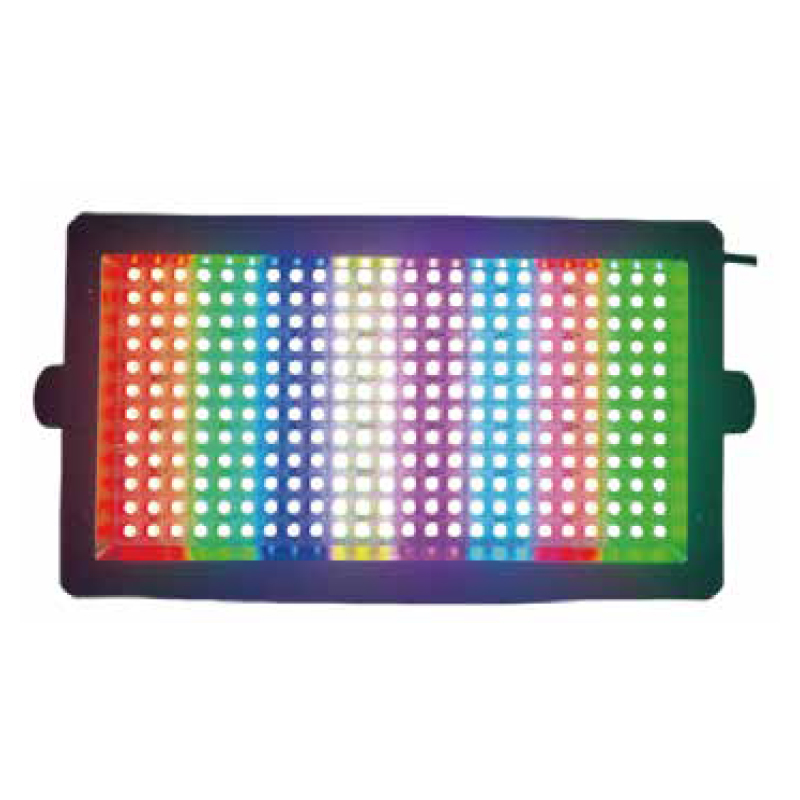
MINI RGB SEGMENT STROBE
55+68-Segment RGB Mini LED Strobe — add segmented RGB patterns to a compact effect rig.
The 55+68-Segment RGB Mini LED Strobe uses 55 grouped RGB segments + 68 individually controlled RGB points and 288 RGB LEDs, with a listed size of 212 × 121mm. The supplied illuminated photograph shows vertical multicolor bands. DMX512, Sound, Auto and Master-Slave operation support the selected playback workflow.
55 grouped RGB segments + 68 individually controlled RGB points
The panel combines 55 grouped RGB segments with 68 individually controlled RGB points for the cue layout.
220 grouped + 68 individual LEDs
The grouped array uses 220 RGB LEDs; a further 68 RGB LEDs each support individual control. All listed LEDs are 0.2W 5050 RGB.
212 × 121mm listed size
Use the listed dimensions to describe available mounting space and fixture positions.
RDM and online upgrade
RDM and DMX512 online upgrading are supported alongside console and standalone playback modes.
SOURCE AND FORMAT
Match the RGB source array to the cue layout.
For the 55+68-Segment RGB Mini LED Strobe, the two RGB groups provide different control arrangements: grouped segments and individually controlled points. Describe the color pattern, fixture spacing and mounting space when selecting quantity and requesting the console chart.
POWER SUPPLY
Plan the AC input and built-in supply separately.
For the 55+68-Segment RGB Mini LED Strobe, aC input is 100–240V at 50/60Hz. The built-in power supply has a listed output specification of 60W / maximum 2.5A. Request fixture electrical-load information for circuit planning.
Specifications
Technical specifications
| Model | RG-908J |
|---|---|
| Light source | 55 segments: 220 × 0.2W 5050 RGB LEDs; 68 individually controlled × 0.2W 5050 RGB LEDs |
| Voltage | AC 100–240V, 50/60Hz |
| Product dimensions | 212 × 121mm |
| Control modes | DMX512, Sound, Auto, Master-Slave; RDM; DMX512 online upgrading |
| Zone control | 55 grouped RGB segments + 68 individually controlled RGB points |
CONTROL SETUP
Choose the playback and management workflow.
Use DMX512 for the cue programming requirements or select a listed standalone or linked mode. Check the operating instructions for addressing, RDM setup and online upgrading.
APPLICATION FIT
Choose a mini panel for segmented RGB cues.
For 55+68-Segment RGB Mini LED Strobe applications, use the mini format where the fixture layout calls for RGB pattern effects in a compact housing. Include venue layout, mounting space, exposure conditions and control requirements when choosing quantity.
Compare other LED strobe lights by source configuration and fixture format.
B2B ORDER FLOW
Request the 55+68 RGB mini configuration.
For your 55+68-Segment RGB Mini LED Strobe order, identify the mini RGB source arrangement and provide the cue, control, installation and shipment details needed for a quotation. For network planning, use ESTA’s DMX512-A guide alongside the fixture’s channel chart.
PRODUCT FAQ
55+68-Segment RGB Mini LED Strobe — Buyer Questions
RGB source array, mini format, control and order configuration.
Which main sources does the 55+68-Segment RGB Mini LED Strobe use?
The grouped RGB array has 55 segments containing 220 LEDs. A second RGB group has 68 LEDs, each individually controlled.
How are the RGB groups controlled on the 55+68-Segment RGB Mini LED Strobe?
Both groups use 0.2W 5050 RGB LEDs: 220 in the 55-segment array and 68 individually controlled sources.
What size is listed?
The supplied size is 212 × 121mm. Request full installation dimensions and bracket clearance for the mounting plan.
What AC input is specified?
Input is AC 100–240V at 50/60Hz. Include local supply and destination plug requirements in the quotation brief.
Which operating modes are available?
DMX512, Sound, Auto and Master-Slave operation are listed. Choose the console, standalone or linked playback workflow required by the event.
Does it support RDM and online upgrading?
RDM and DMX512 online upgrading are supported. Obtain the supported instructions and firmware procedure for the ordered version.
How should I prepare the console setup?
Request the matching channel chart and segment map. Identify the console and required RGB cue sequence when planning addressing.
What should I include in a quotation request?
Send quantity, venue layout, mounting space, fixture positions, RGB cue brief, operating mode, console, RDM requirements, AC supply and plugs, destination and delivery date. Request mounting accessories, full installation dimensions, weights, packing and electrical-load information.
START YOUR PROJECT
Request Product Information.
Tell us the quantity and delivery requirements. Our sales team will prepare suitable options for your project.